
LensKit Pro — The Ultimate WooCommerce Lens Customization Plugin

LensKit Pro — The Ultimate WooCommerce Lens Customization Plugin
demo.lyynk.in/lenskit/wp-admin

Username: shopmanager

Password: shopmanager@123

Product Overview

LensKit Pro is a powerful WooCommerce plugin designed specifically for optical retailers and eyewear e-commerce stores. It adds a comprehensive, multi-step lens customization wizard to your product pages, allowing customers to configure their eyeglasses or sunglasses with prescription details, lens types, coatings, tints, and more — all before adding to cart.

The plugin seamlessly integrates with WooCommerce, using your store’s existing currency settings and product catalog. It replaces the standard “Add to Cart” button on assigned products with a “Select Lenses” button that launches an elegant, guided wizard experience.
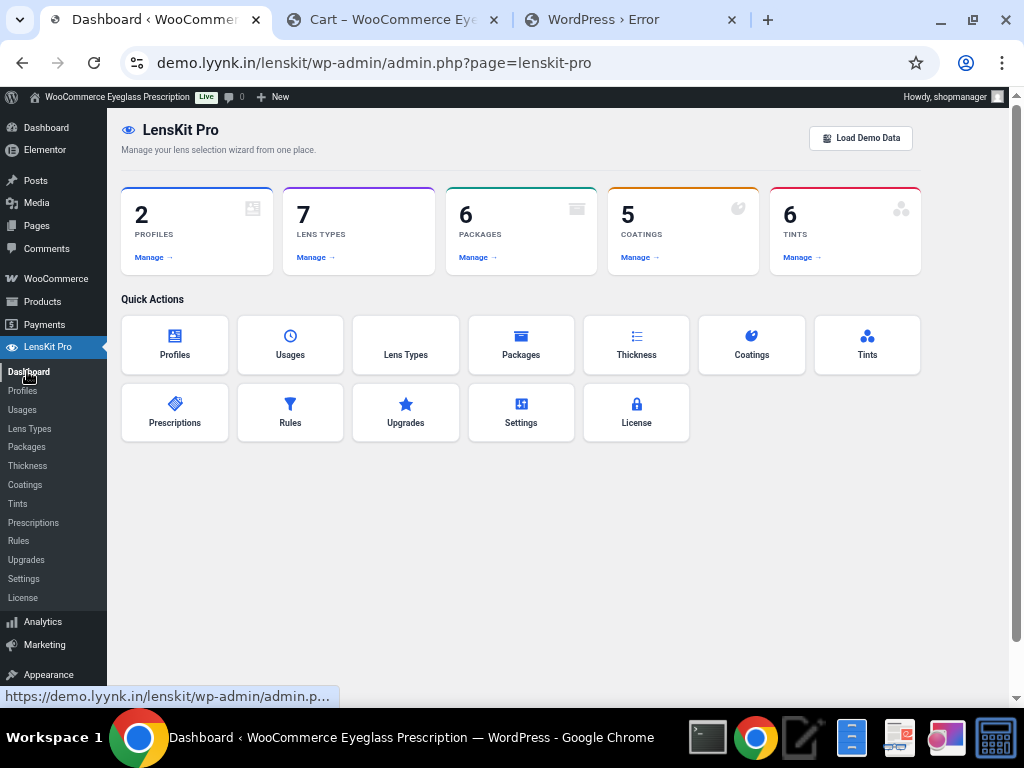
The LensKit Pro admin dashboard provides a quick overview of all configured items: Profiles, Lens Types, Packages, Coatings, and Tints.


Key Features at a Glance

    • 🔧 Multi-Step Lens Selection Wizard — Up to 8 customizable steps guiding customers through lens configuration

    • 👓 Profile-Based Product Assignment — Create different profiles for eyeglasses vs. sunglasses with unique step configurations

    • 📋 Prescription Management — Full prescription input with SPH, CYL, AXIS, ADD, PD fields, upload support, and “provide later” option

    • 🔍 Lens Type Selection — Single Vision, Bifocal, Progressive, Non-Prescription (Plano), and Sunglasses options

    • 📦 Lens Packages — Tiered package options (Standard, Premium, Ultra Thin) with individual pricing

    • 📏 Thickness Options — Configurable lens thickness levels (1.50, 1.56, 1.61, 1.67) with pricing

    • 🛡️ Coatings & Treatments — Anti-Reflection, UV400, Blue Light Filter, Scratch Resistant, Photochromic

    • 🎨 Lens Tints — Solid and Gradient tint options with color previews and pricing

    • ⬆️ Upgrade Plans — Add-on options like Warranty Plus, Express Delivery, Clip-On Sunglasses

    • 📐 Prescription Rules Engine — Auto-recommend packages and lens types based on prescription values

    • 💰 Real-Time Price Calculation — Running total displayed throughout the wizard

    • 🎨 Fully Customizable UI — Custom colors, button text, HTML templates, and CSS styling

    • 🛒 WooCommerce Cart Integration — Full lens details displayed in cart with itemized pricing


Detailed Feature Descriptions

1. Profiles — Flexible Product Configuration

Profiles are the backbone of LensKit Pro. Each profile defines a complete lens selection workflow and can be assigned to specific products or product categories. You can create separate profiles for different product types (e.g., Eyeglasses vs. Sunglasses) with unique step configurations.
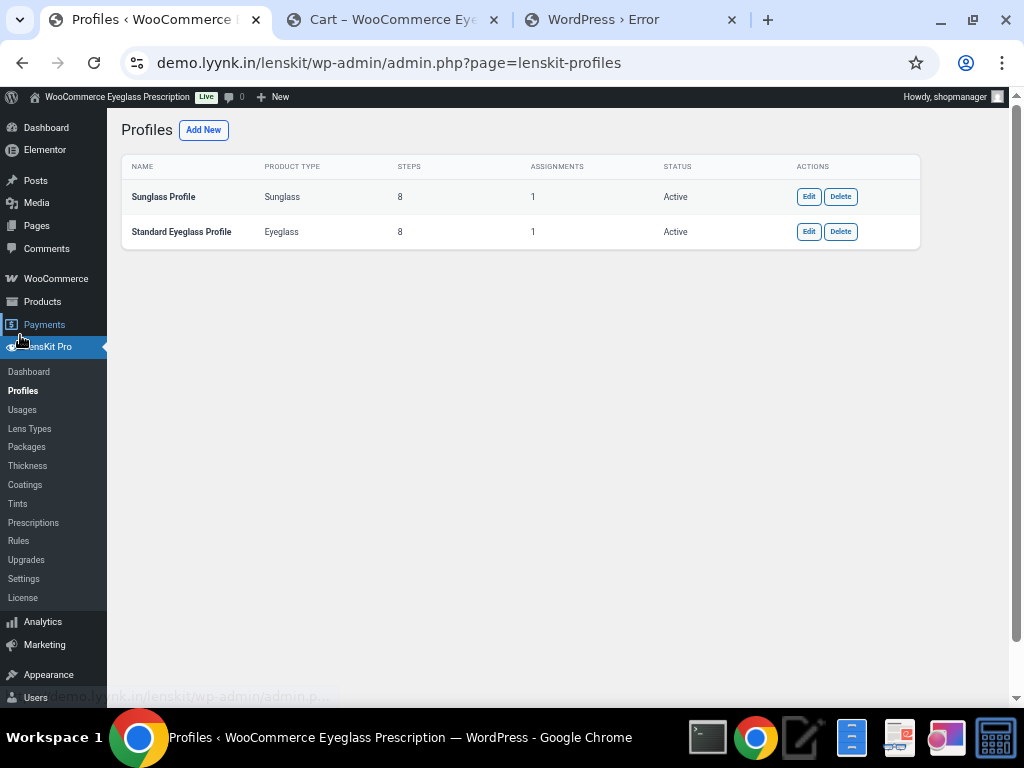
Two profiles configured: Sunglass Profile and Standard Eyeglass Profile, each with 8 steps.

Each profile features a drag-and-drop Step Builder where you can enable/disable steps, mark them as required, and control which items appear in each step. Steps can be reordered (with some constraints — Prescription always precedes Package & Thickness, and Review is always last).
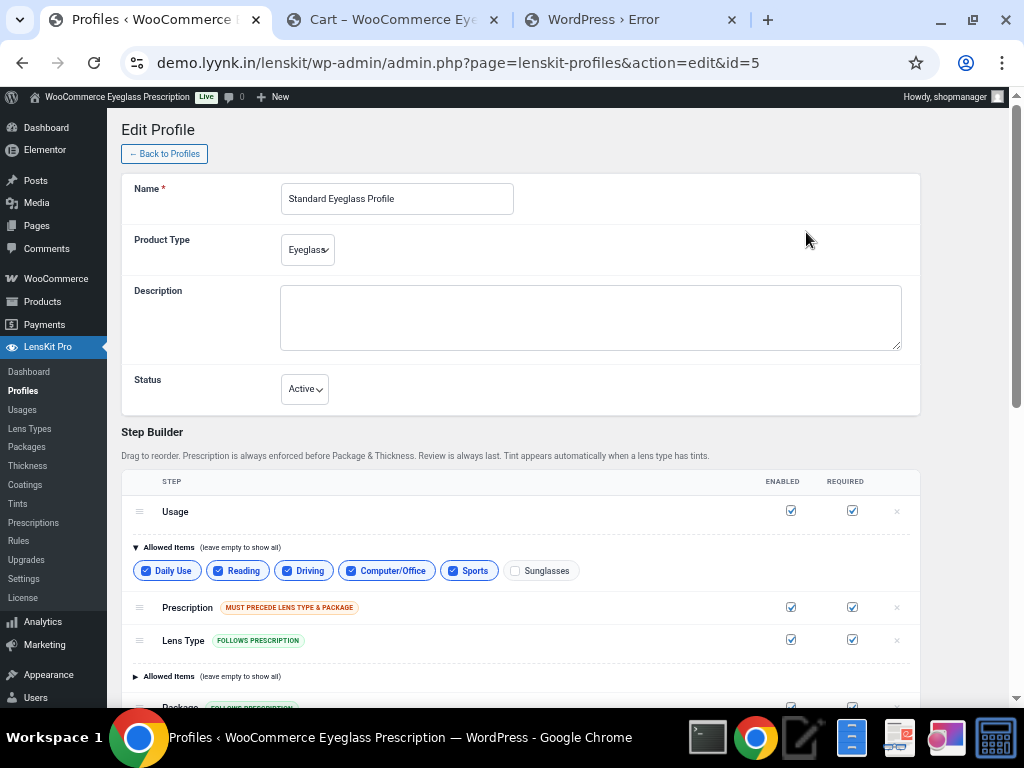
The Step Builder showing Usage, Prescription, and Lens Type steps with allowed items configuration.
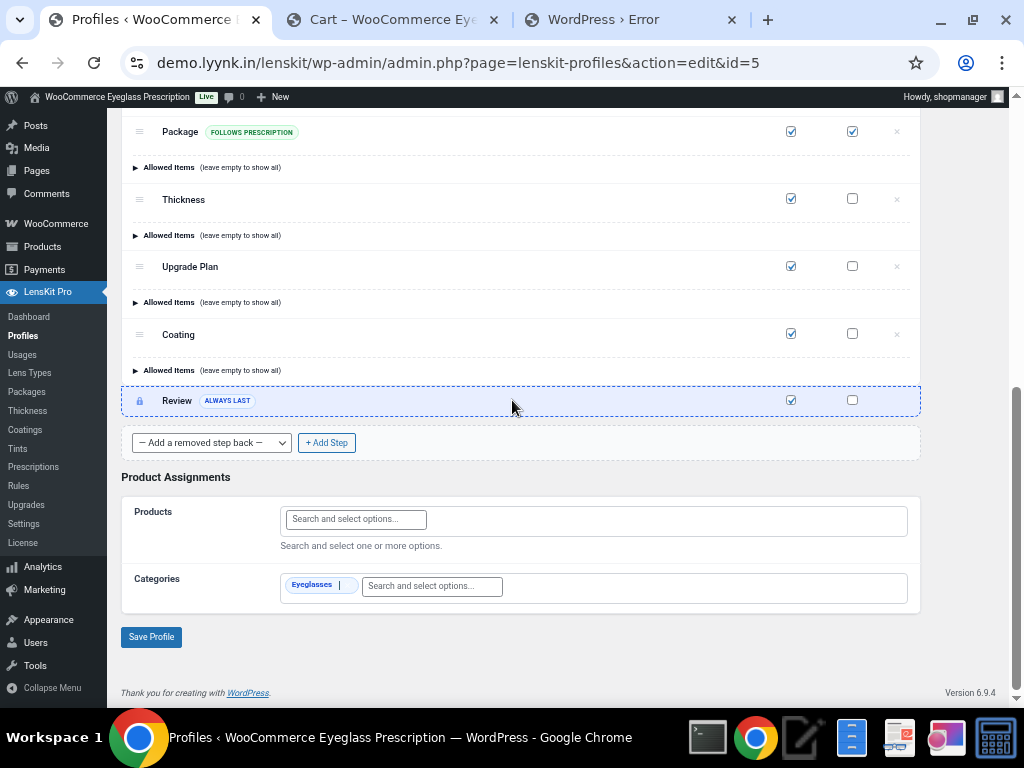
Package, Thickness, Upgrade Plan, Coating, and Review steps, plus Product Assignments by product or category.

Key Profile Features:

    • Product Type selection (Eyeglass or Sunglass)

    • Per-step enable/disable and required toggles

    • Allowed items filtering per step

    • Product and Category-based assignment

    • Drag-to-reorder step sequencing


2. Usage Selection (Step 1)

The first step in the wizard lets customers specify how they’ll use their eyewear. This helps guide recommendations throughout the rest of the process.
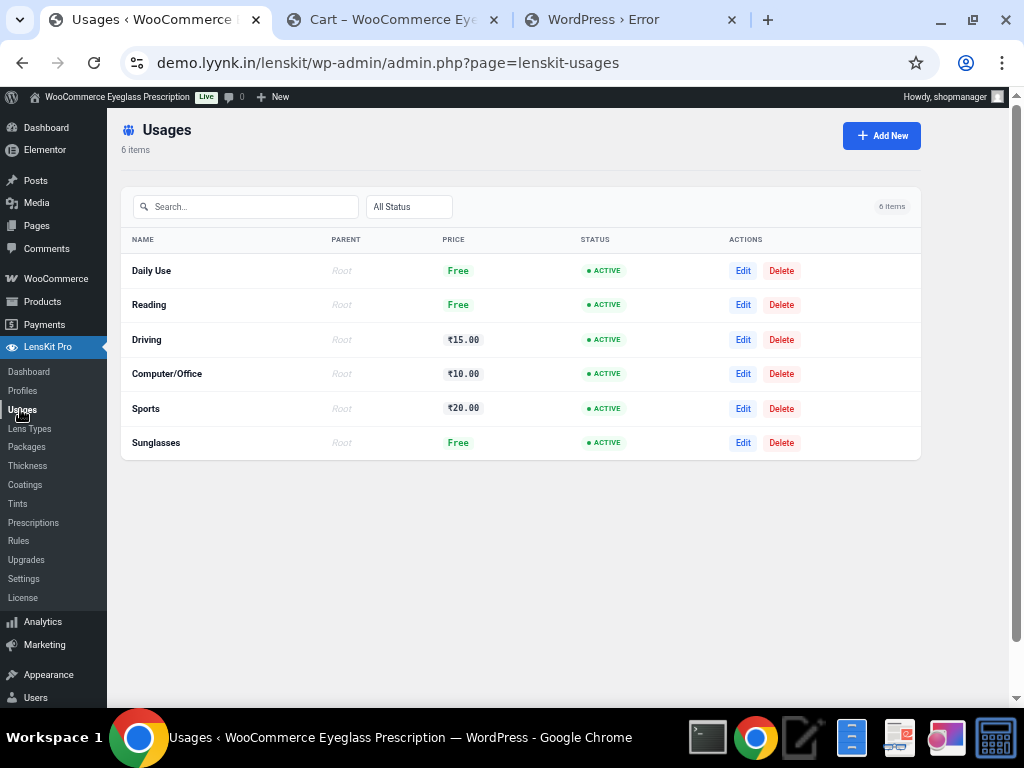

Admin view: Configurable usage options with icons, tooltips, and active/inactive status.
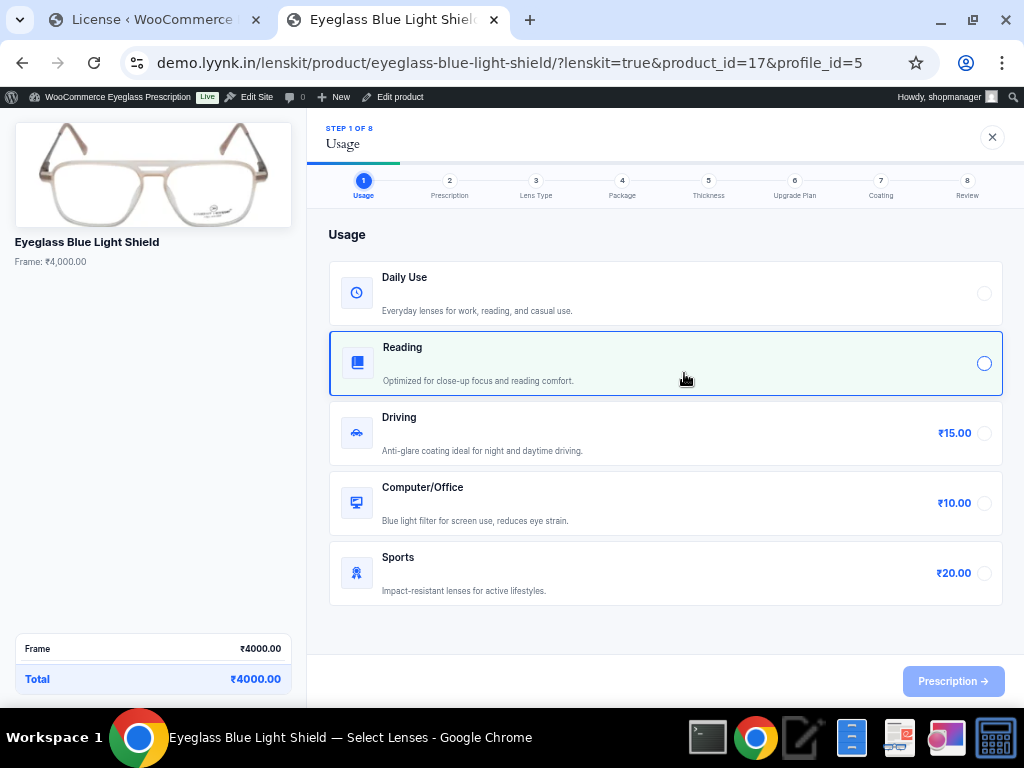

Frontend wizard: Customers choose from Daily Use, Reading, Driving, Computer/Office, or Sports with a visual progress bar.

Each usage option can have a custom icon, tooltip description, and can be toggled active/inactive. The progress bar at the top shows customers exactly where they are in the 8-step process.


3. Prescription Input (Step 2)

LensKit Pro offers three flexible ways for customers to provide their prescription:
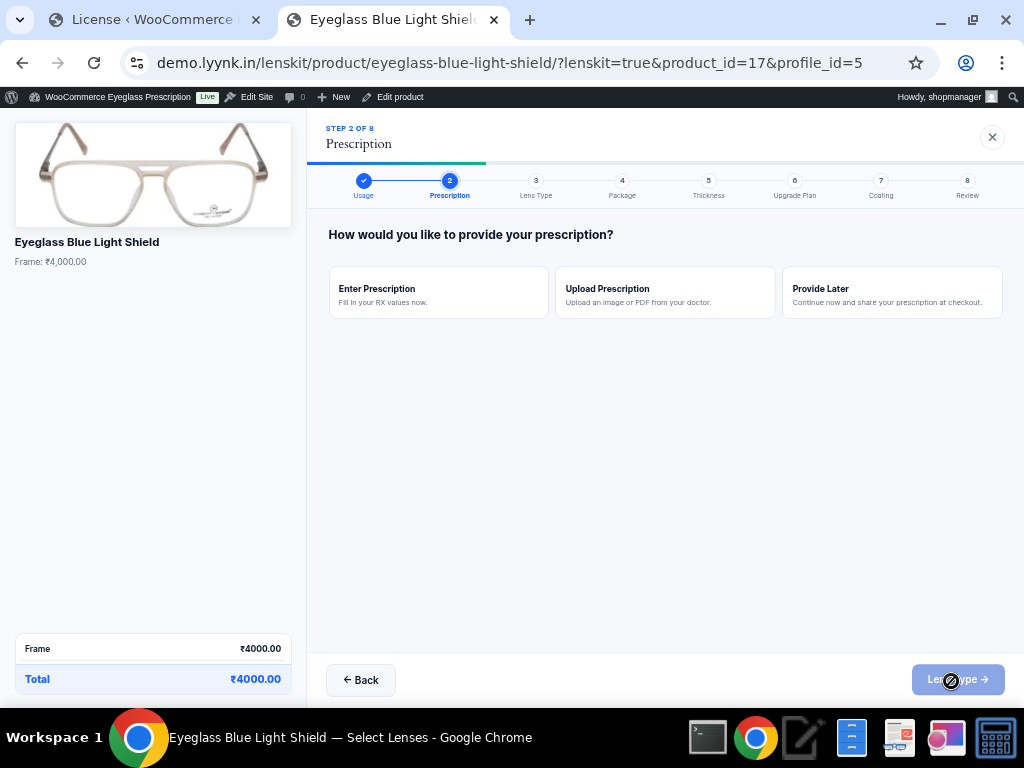

Three prescription input methods: Enter manually, Upload a file, or Provide Later.

Manual Prescription Entry

The manual entry form provides separate fields for Right Eye (OD) and Left Eye (OS) with all standard optometric measurements:
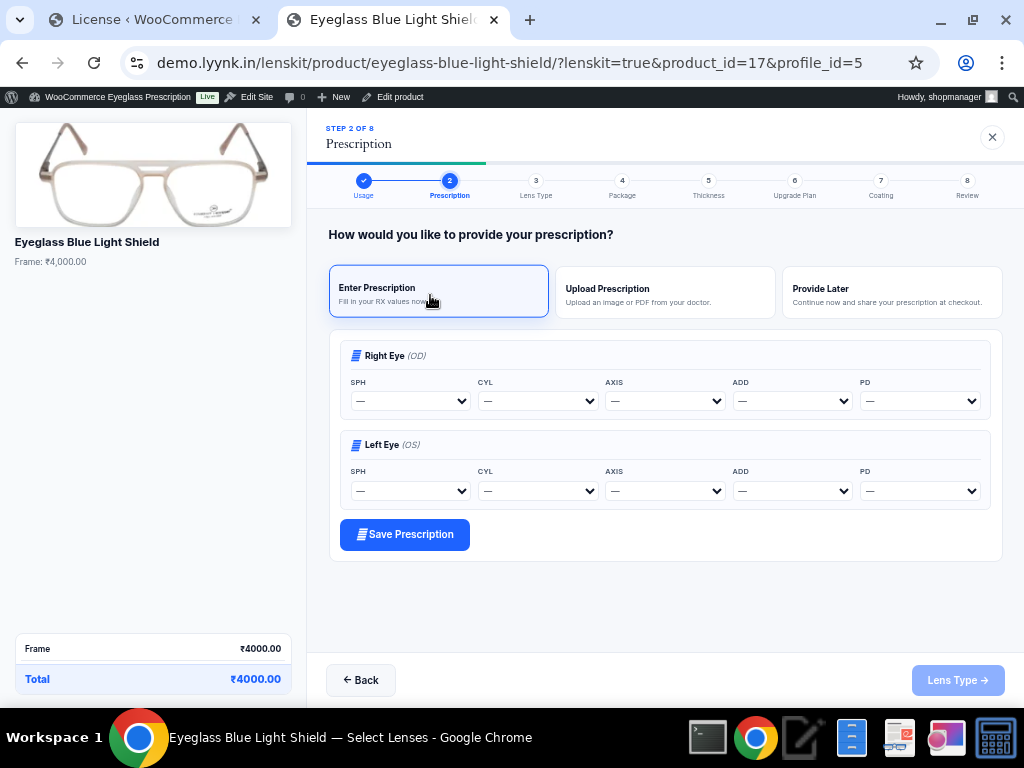


Full prescription form with SPH, CYL, AXIS, ADD, and PD fields for both eyes.

Prescription Configuration (Admin)

Store owners have granular control over prescription field ranges and step values:
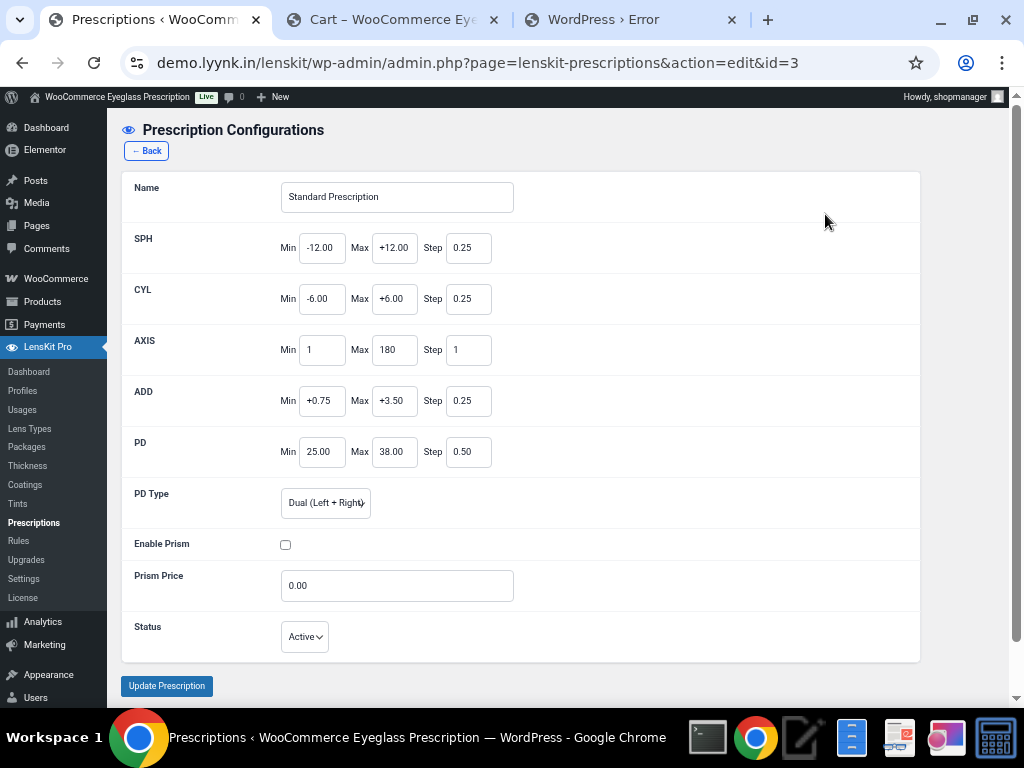


Admin configuration: Set min/max/step values for SPH (-12.00 to +12.00), CYL (-6.00 to +6.00), AXIS (1-180), ADD (+0.75 to +3.50), and PD (25.00-38.00). Supports Dual PD (Left + Right), Enable Prism option, and Prism pricing.

Prescription Features:

    • SPH range: -12.00 to +12.00 (step 0.25)

    • CYL range: -6.00 to +6.00 (step 0.25)

    • AXIS range: 1 to 180 (step 1)

    • ADD range: +0.75 to +3.50 (step 0.25)

    • PD range: 25.00 to 38.00 (step 0.50)

    • Dual PD support (Left + Right)

    • Optional Prism correction with additional pricing

    • Prescription upload (image/PDF)

    • “Provide Later” option for customers who don’t have their prescription handy


4. Lens Type Selection (Step 3)

Customers choose their lens type based on their vision needs. Each lens type can have its own pricing.
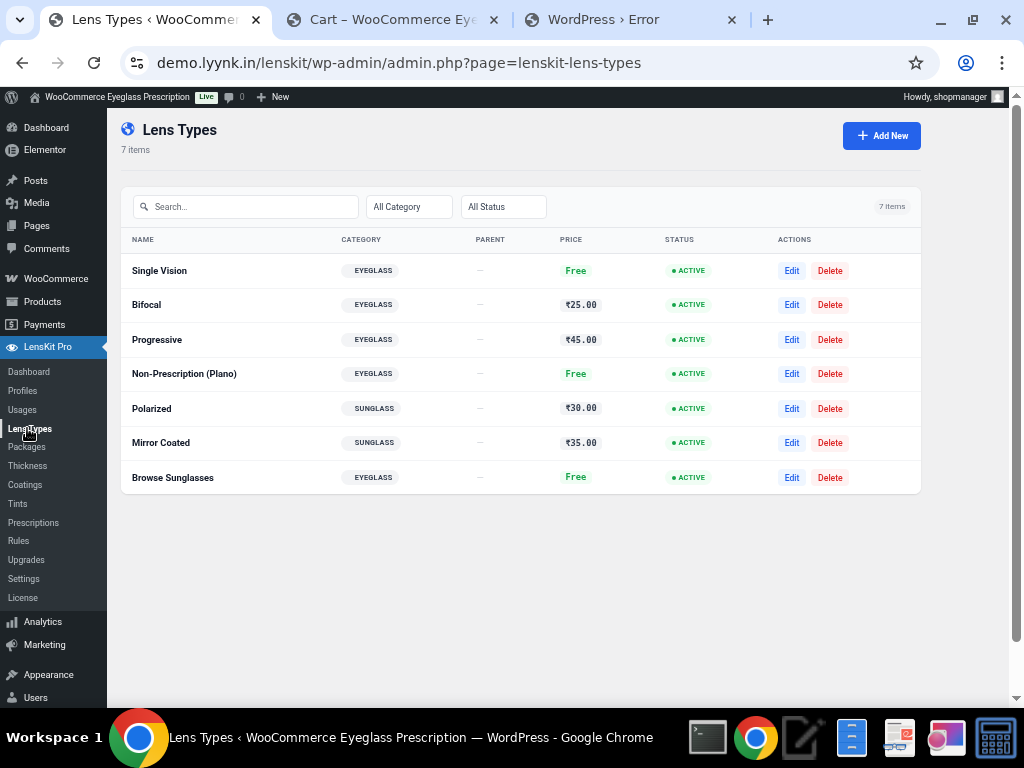

Admin view: Lens types with configurable prices, icons, tooltips, and status.
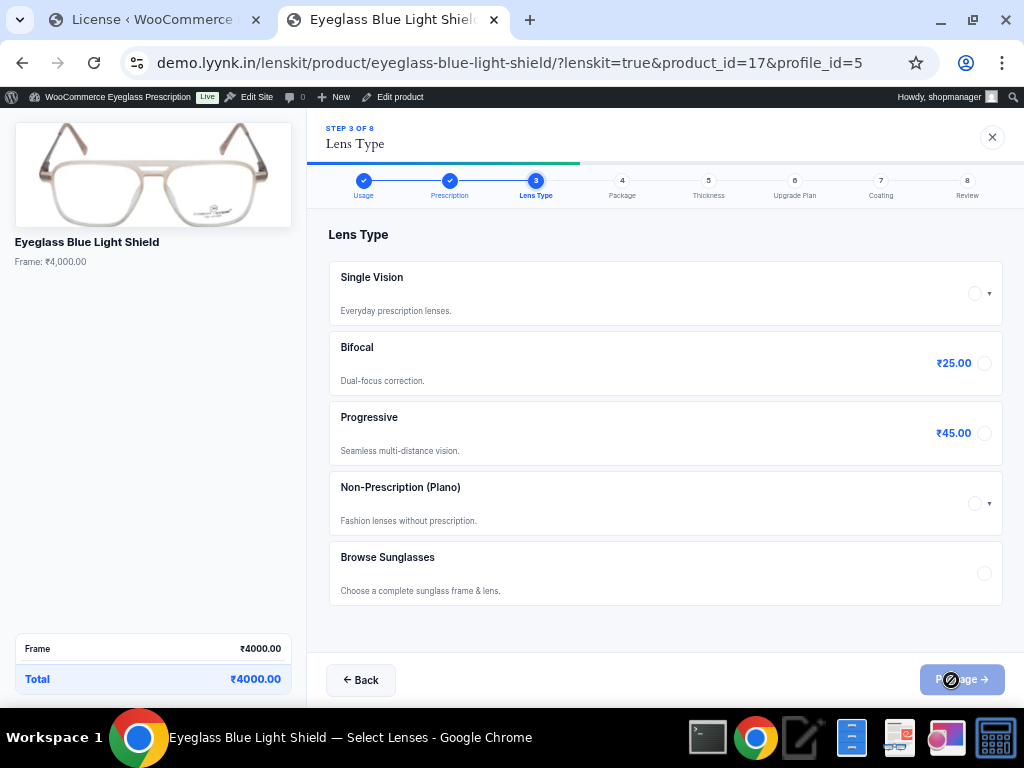

Frontend: Single Vision, Bifocal (+₹25), Progressive (+₹45), Non-Prescription (Plano), and Browse Sunglasses options.

Available Lens Types:

    • Single Vision — For single-distance correction

    • Bifocal — For near and far vision (+₹25)

    • Progressive — Seamless multifocal lenses (+₹45)

    • Non-Prescription (Plano) — Fashion/protective eyewear

    • Browse Sunglasses — Redirects to sunglass options


5. Lens Packages (Step 4)

Tiered lens packages allow stores to offer good-better-best options with clear value differentiation.
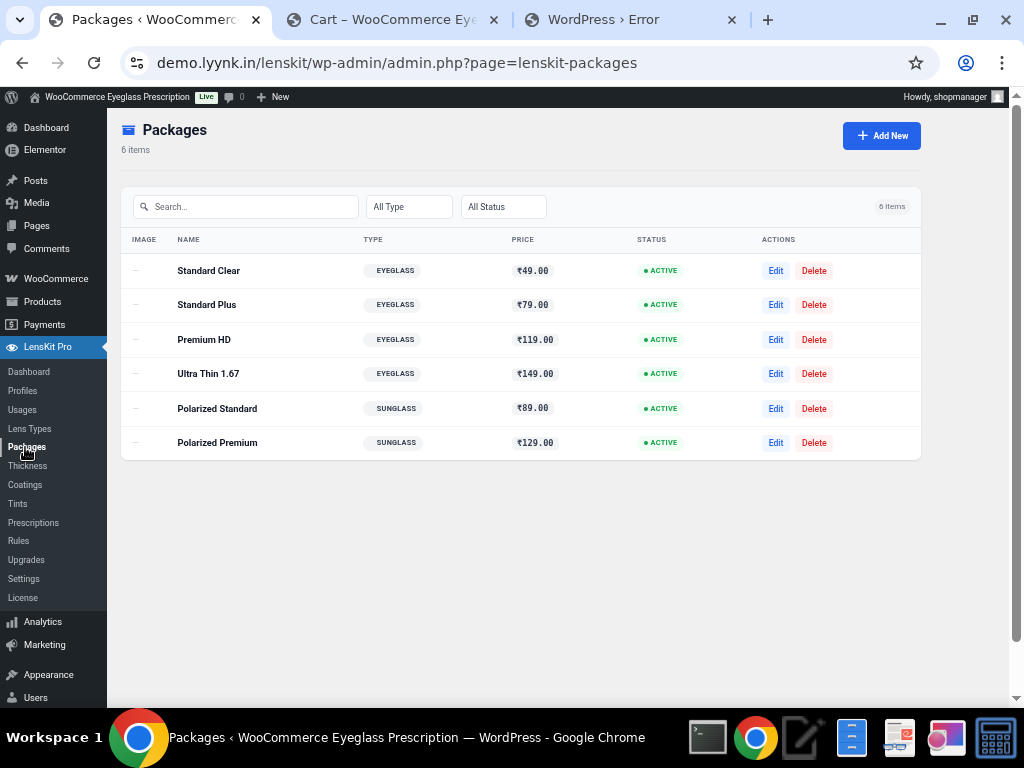

Admin view: Four package tiers with pricing and descriptions.
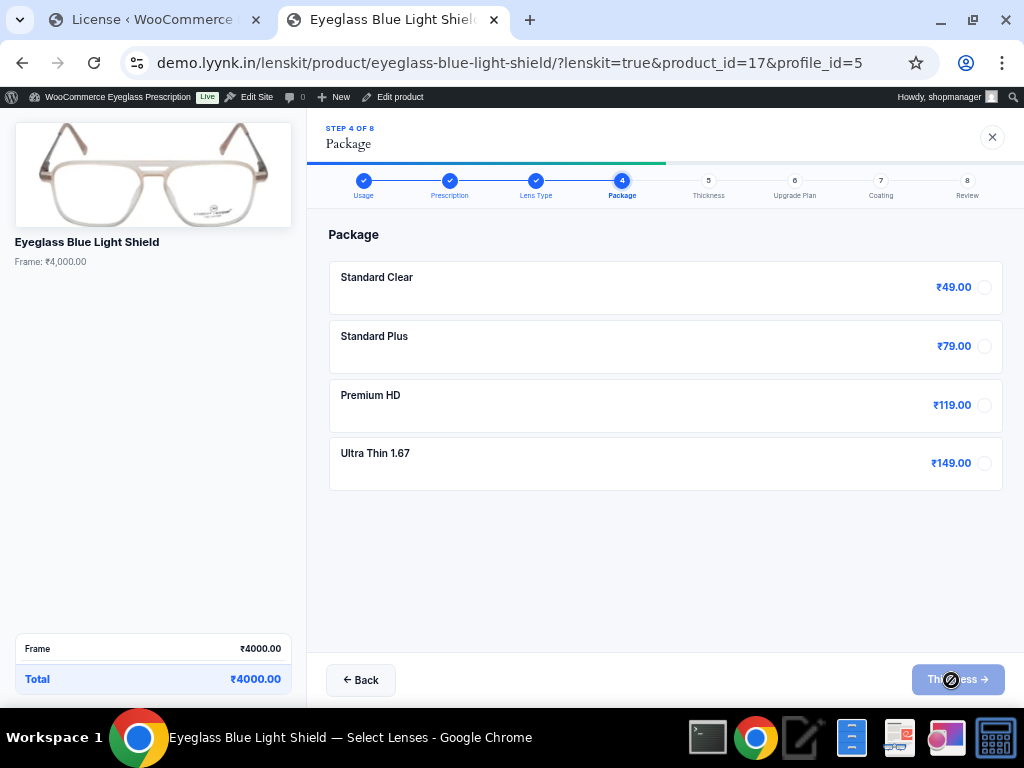

Frontend: Standard Clear (₹49), Standard Plus (₹79), Premium HD (₹119), Ultra Thin 1.67 (₹149).

Each package can include a description, icon, and tooltip to help customers understand the differences between tiers.


6. Lens Thickness (Step 5)

Customers can upgrade their lens thickness for thinner, lighter lenses — especially important for stronger prescriptions.
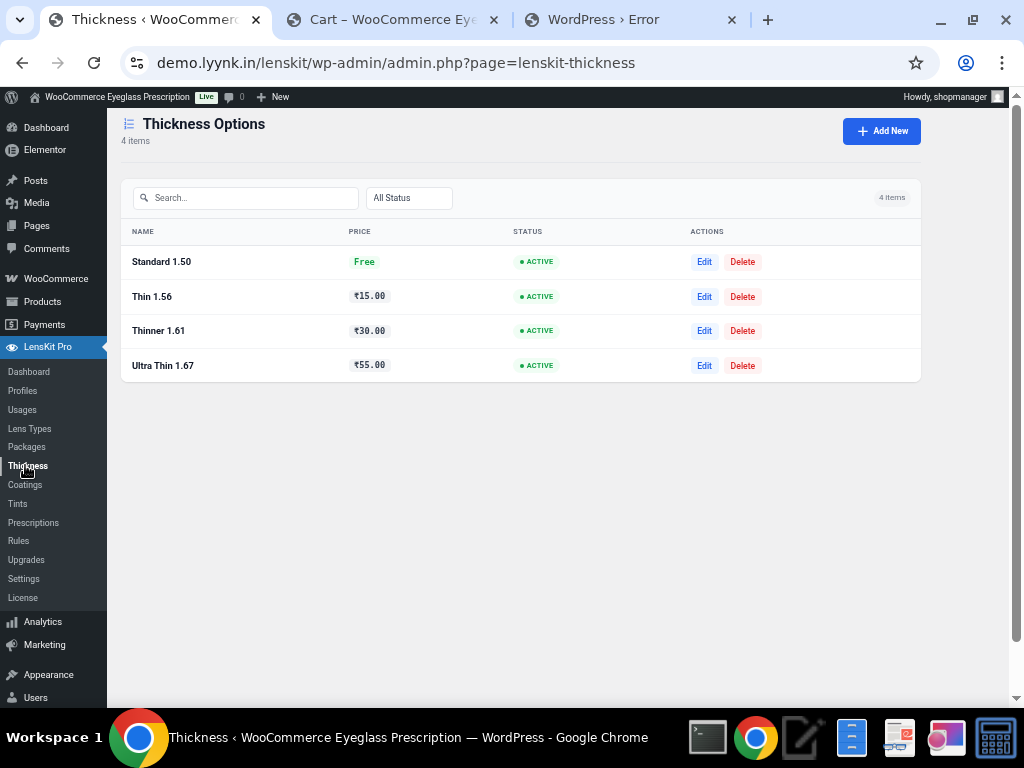

Admin view: Four thickness options from Standard 1.50 to Ultra Thin 1.67.
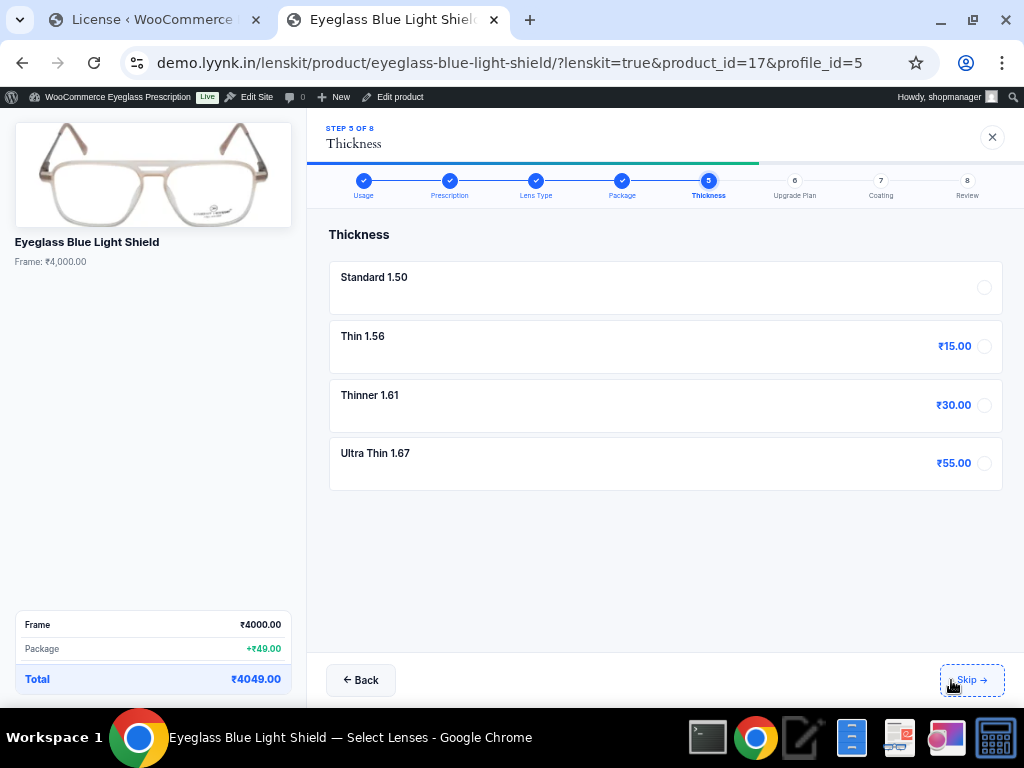

Frontend: Standard 1.50 (included), Thin 1.56 (+₹15), Thinner 1.61 (+₹30), Ultra Thin 1.67 (+₹55). Note the running price total at the bottom left showing Frame ₹4,000 + Package ₹49 = ₹4,049.


7. Upgrade Plans (Step 6)

Offer additional services and accessories as upsell opportunities during the lens selection process.
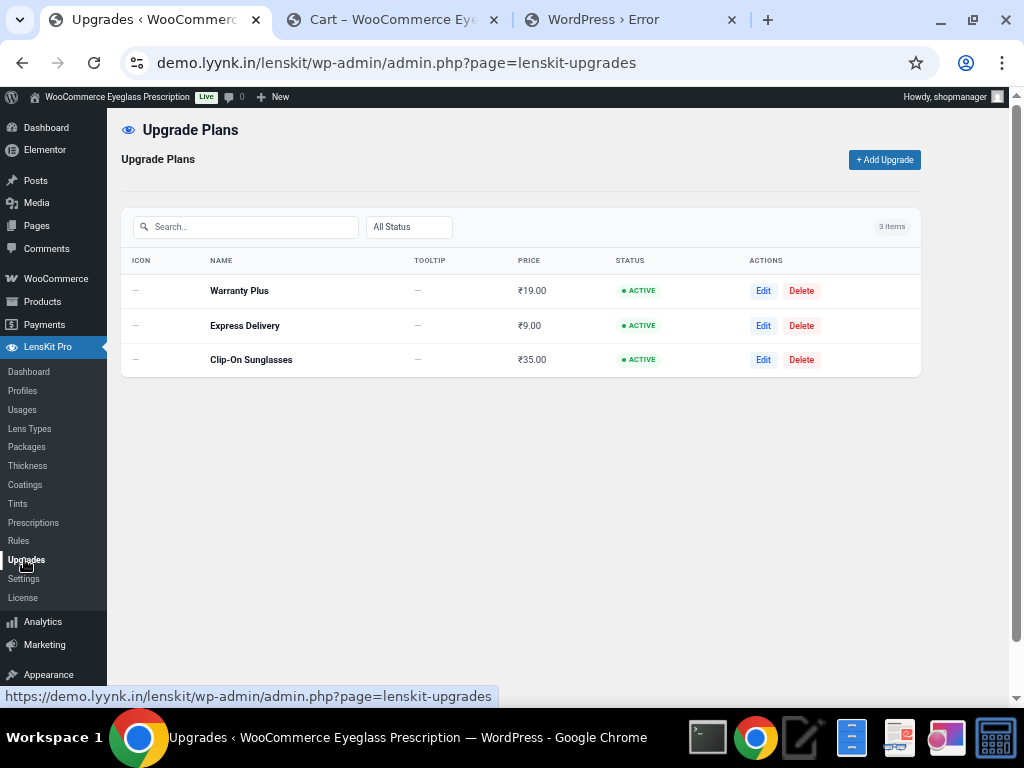


Admin view: Warranty Plus (₹19), Express Delivery (₹9), Clip-On Sunglasses (₹35).
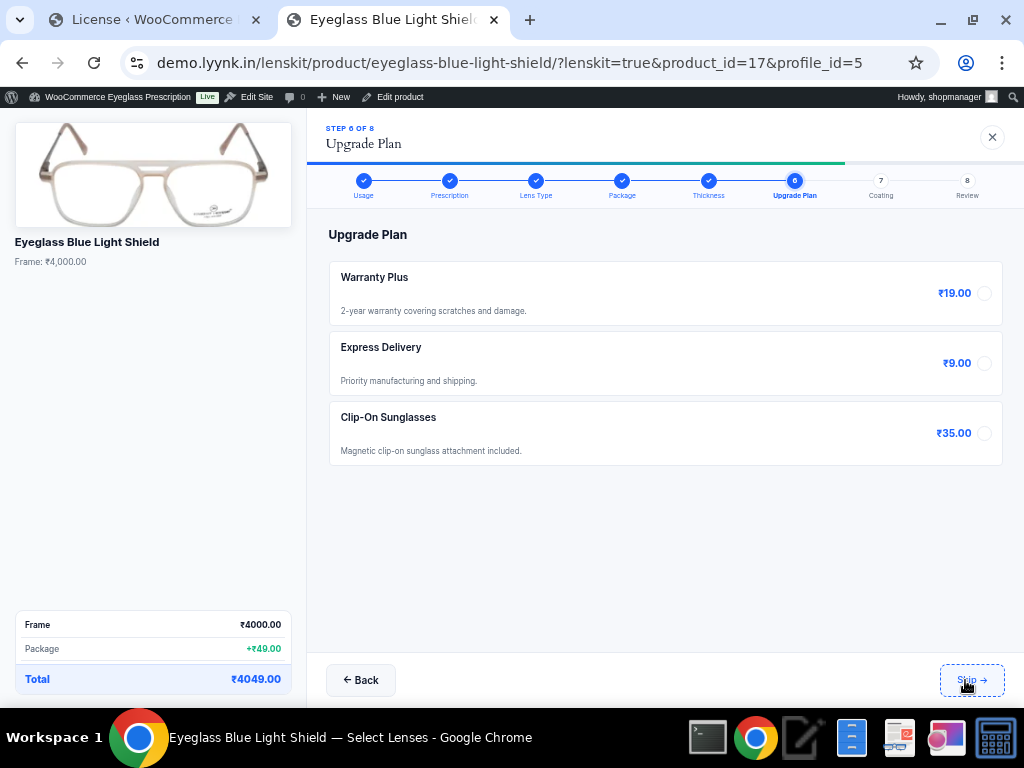

Frontend: Optional upgrade add-ons that customers can select to enhance their order.


8. Lens Coatings & Treatments (Step 7)

Multiple coatings can be selected simultaneously, allowing customers to build their ideal lens protection stack.
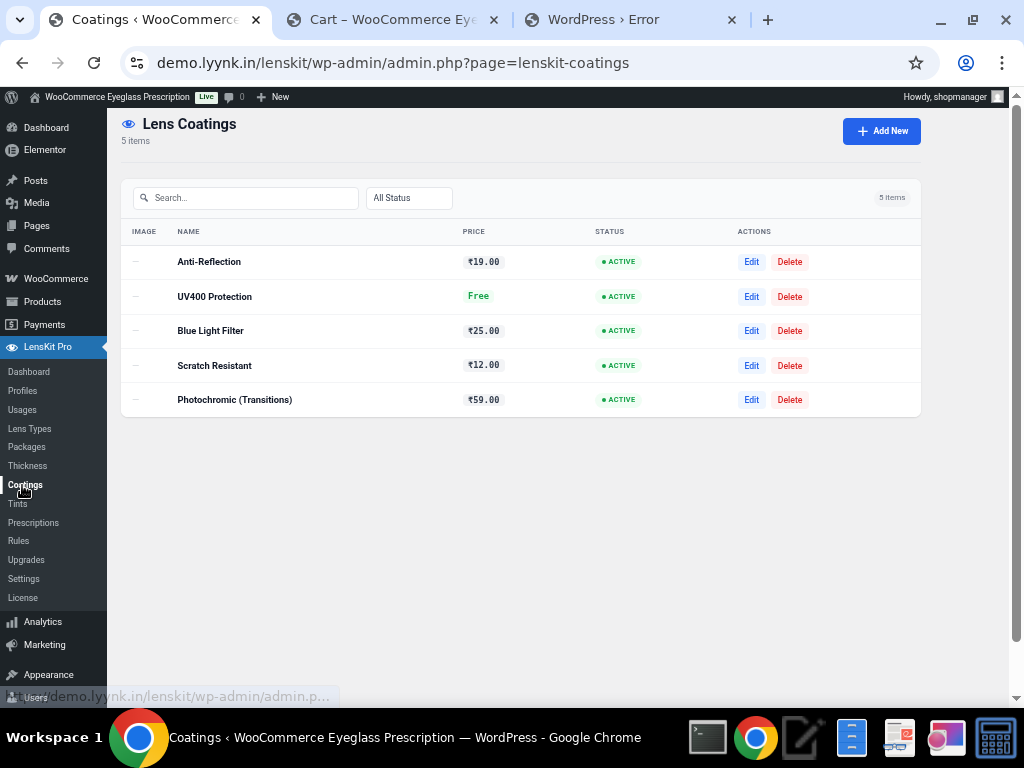

Admin view: Five coating options with individual pricing (including free options like UV400 Protection).
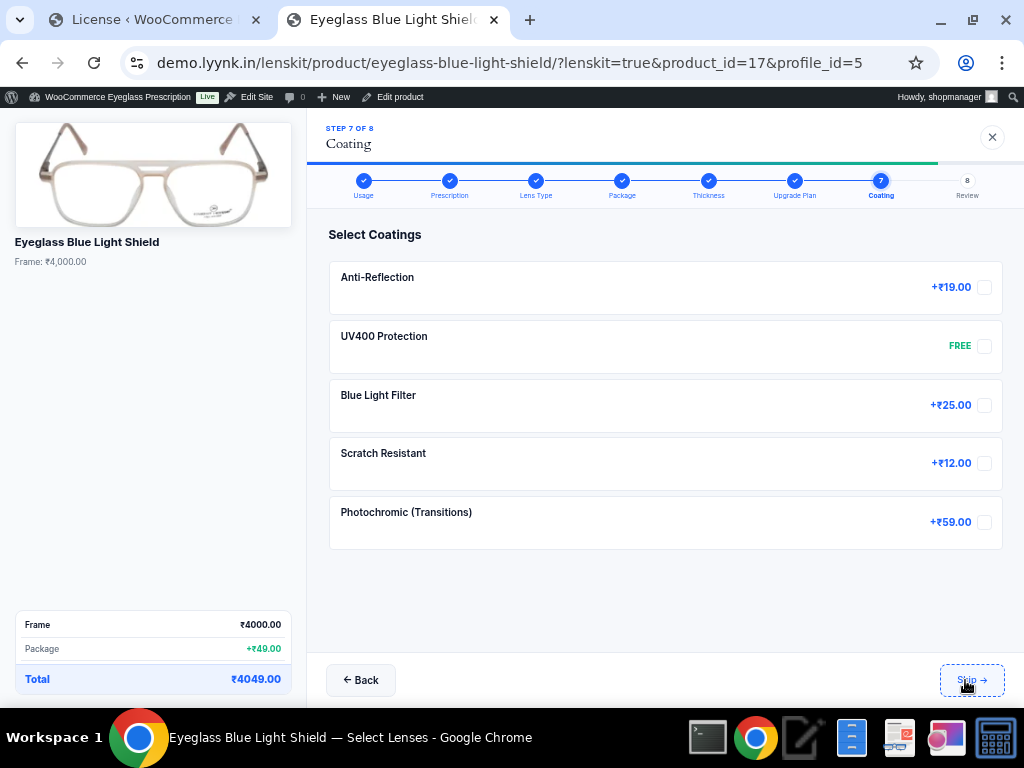

Frontend: Anti-Reflection (+₹19), UV400 Protection (FREE), Blue Light Filter (+₹25), Scratch Resistant (+₹12), Photochromic/Transitions (+₹59). Multiple selections allowed!

Available Coatings:

    • Anti-Reflection — Reduces glare (+₹19)

    • UV400 Protection — Blocks harmful UV rays (FREE)

    • Blue Light Filter — Protects against digital screen blue light (+₹25)

    • Scratch Resistant — Durable scratch protection (+₹12)

    • Photochromic (Transitions) — Auto-darkening lenses (+₹59)


9. Lens Tints

For sunglasses and fashion eyewear, LensKit Pro offers a rich tint selection system with color previews.
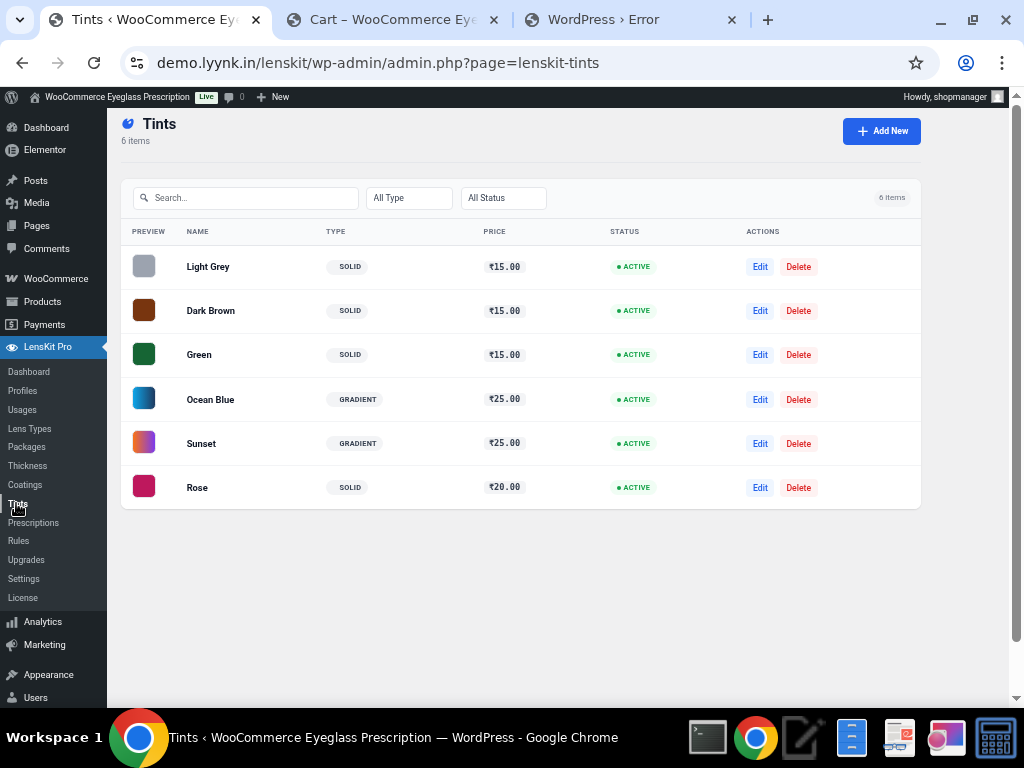

Admin view: Six tint options in Solid and Gradient types with color previews — Light Grey, Dark Brown, Green, Ocean Blue (Gradient), Sunset (Gradient), and Rose.

Tint Features:

    • Solid and Gradient tint types

    • Visual color preview swatches

    • Individual pricing per tint (₹15–₹25)

    • Tint step appears automatically when a lens type has tints configured


10. Prescription Rules Engine

One of LensKit Pro’s most powerful features is the Prescription Rules Engine, which automatically recommends lens packages and types based on the customer’s prescription values.
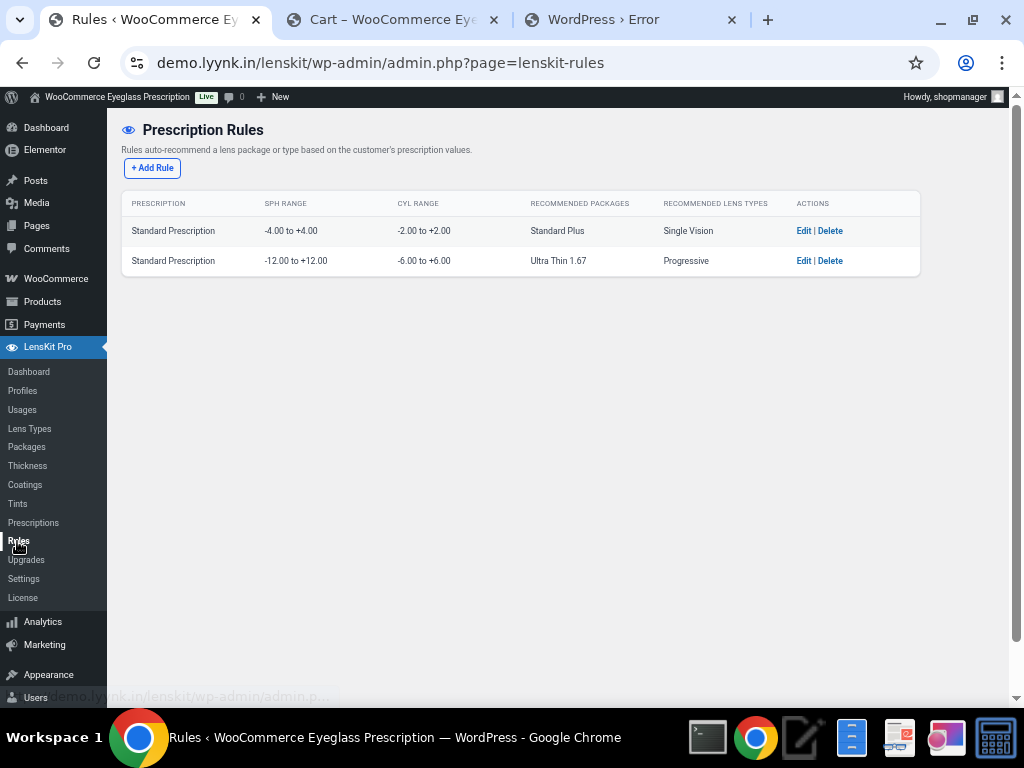

Two rules configured: Standard prescriptions (SPH -4.00 to +4.00, CYL -2.00 to +2.00) get Standard Plus + Single Vision recommended. Stronger prescriptions (SPH -12.00 to +12.00, CYL -6.00 to +6.00) get Ultra Thin 1.67 + Progressive recommended.

This intelligent recommendation system helps customers choose the right lens configuration for their prescription strength, improving customer satisfaction and reducing returns.


11. Order Review & Real-Time Pricing (Step 8)

The final step presents a comprehensive summary of all selections with a clear price breakdown before adding to cart.
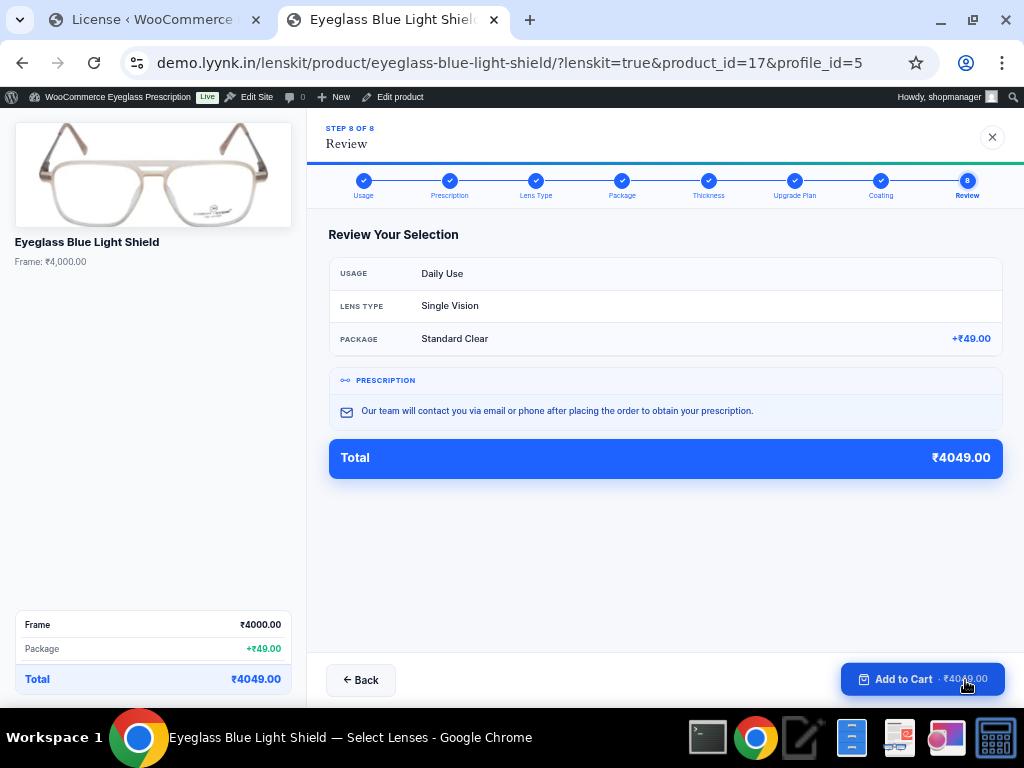

Complete order review showing all selections: Usage, Lens Type, Package, Prescription status, and total price (₹4,049).
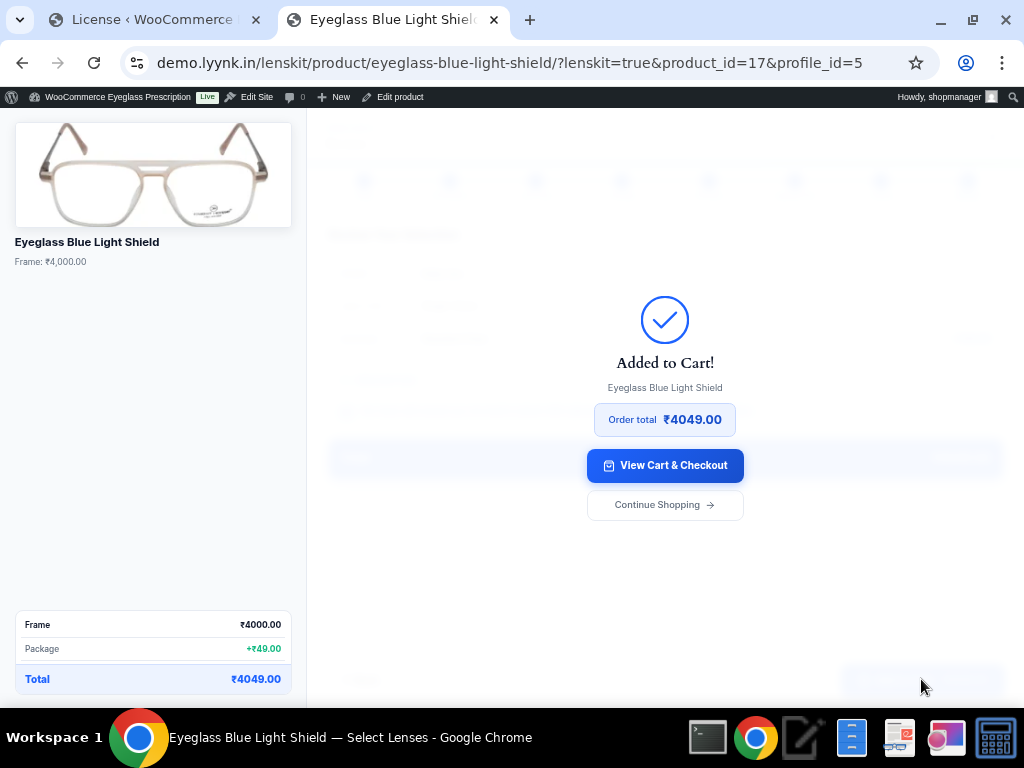

Confirmation screen after adding to cart with the order total displayed.


12. WooCommerce Cart Integration

Lens configuration details are fully integrated into the WooCommerce cart, showing customers exactly what they’re purchasing.
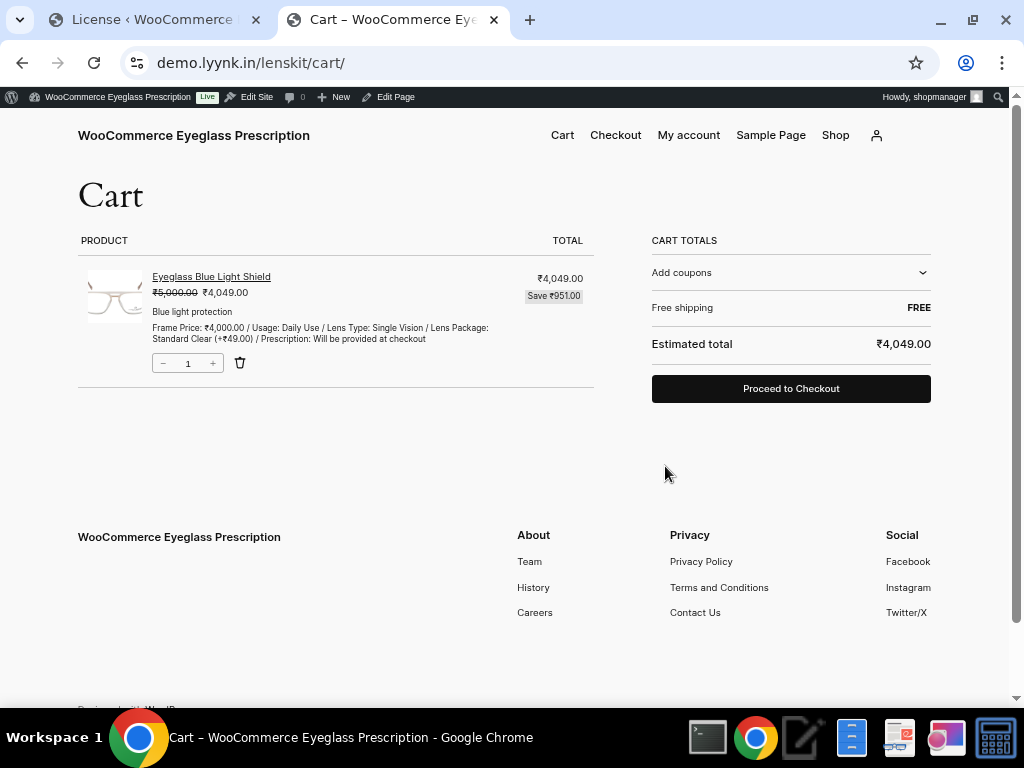

Cart page showing the product with all lens details: Frame Price (₹4,000), Usage (Daily Use), Lens Type (Single Vision), Package (Standard Clear +₹49), and Prescription status. The “Save ₹951” badge adds a compelling value proposition.


13. Customizable Settings

LensKit Pro offers extensive customization options to match your store’s branding and workflow.
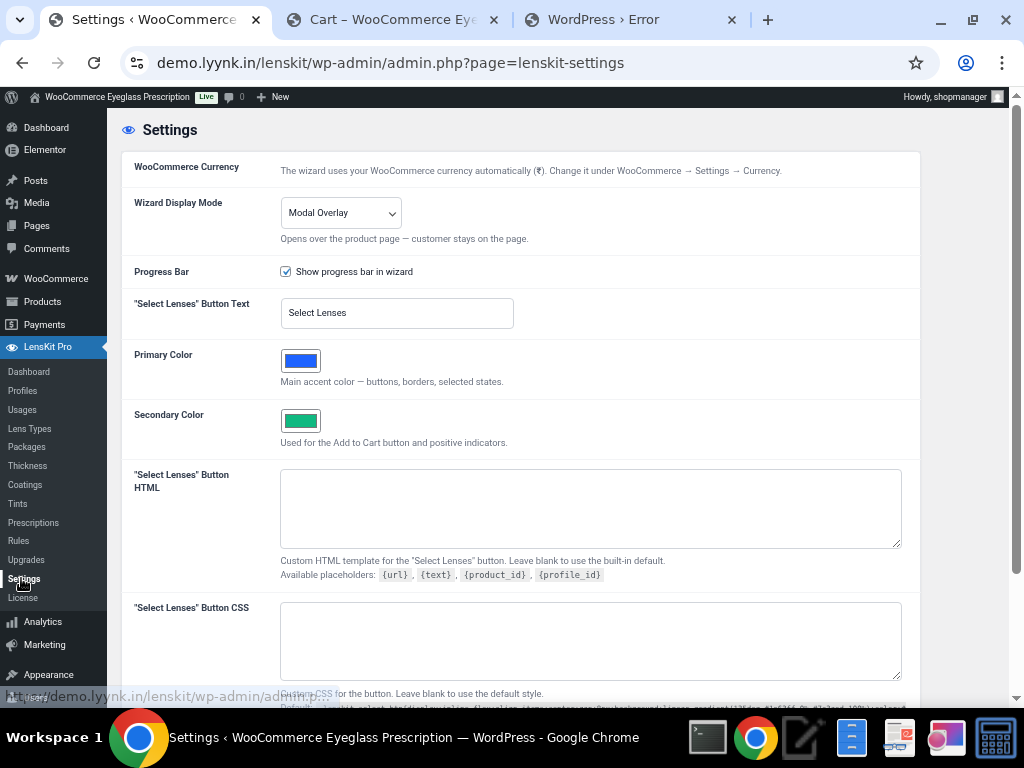

Settings page: Wizard Display Mode (Modal Overlay), Progress Bar toggle, Button Text customization, Primary and Secondary Color pickers.

Settings Bottom
Advanced settings: Custom HTML template for the “Select Lenses” button with placeholders ({url}, {text}, {product_id}, {profile_id}), and Custom CSS styling.

Customization Options:

    • Wizard Display Mode — Modal Overlay (opens over the product page)

    • Progress Bar — Show/hide the step progress indicator

    • Button Text — Customize the “Select Lenses” button label

    • Primary Color — Main accent color for buttons, borders, and selected states

    • Secondary Color — Used for Add to Cart button and positive indicators

    • Custom Button HTML — Full HTML template with dynamic placeholders

    • Custom Button CSS — Override default button styling with your own CSS


14. Product Page Integration

The plugin seamlessly replaces the standard WooCommerce “Add to Cart” button with a branded “Select Lenses” button on assigned products.
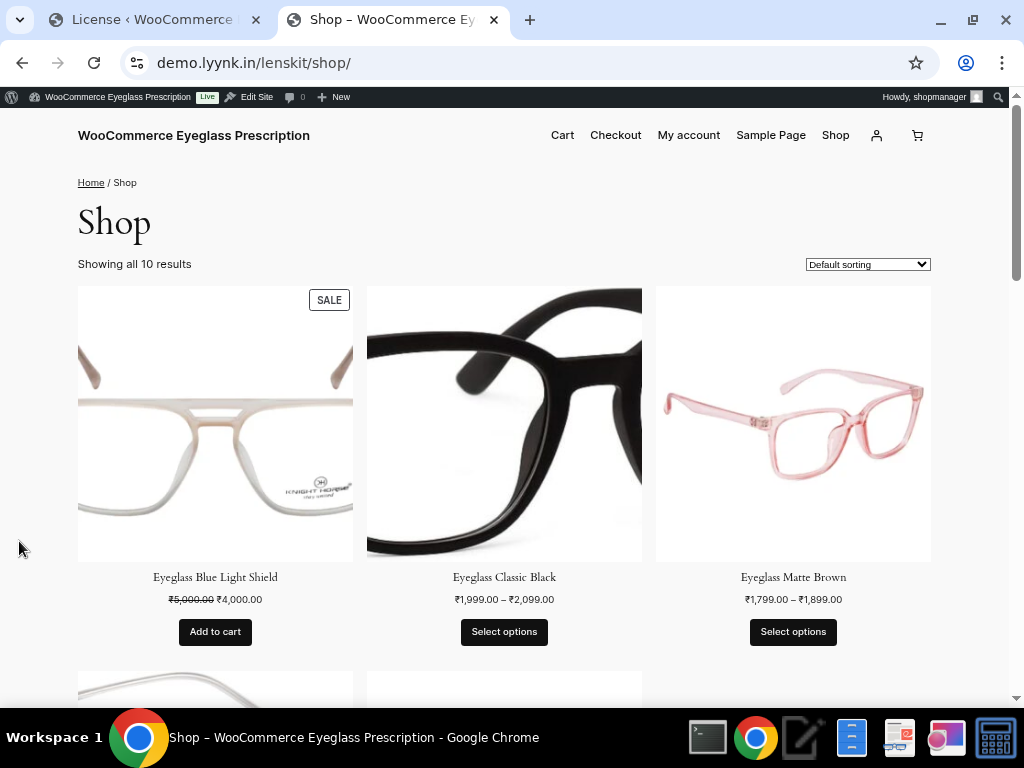

Shop page showing eyeglass products with the LensKit integration.


Individual product page with the “Select Lenses” button replacing the standard Add to Cart.


Benefits for Store Owners

💰 Increased Average Order Value

The step-by-step upsell flow naturally guides customers through premium options, coatings, and upgrades — increasing the average order value with every lens purchase.

🎯 Reduced Returns & Exchanges

The Prescription Rules Engine ensures customers get the right lens type and package for their prescription, reducing costly returns and exchanges.

⚡ Streamlined Operations

All prescription and lens configuration data is captured at the point of sale and flows directly into WooCommerce orders, eliminating manual data entry and phone calls.

🎨 Brand-Consistent Experience

Full color, HTML, and CSS customization ensures the lens wizard matches your store’s look and feel perfectly.

📱 Flexible Prescription Collection

Three prescription input methods (manual entry, file upload, provide later) accommodate every customer scenario, reducing cart abandonment.

🔧 Easy Administration

The intuitive admin interface makes it simple to manage lens types, packages, coatings, tints, and pricing without any coding knowledge.

📊 Profile-Based Flexibility

Different profiles for different product types mean you can offer completely different lens workflows for eyeglasses vs. sunglasses.


Use Cases

1. Online Optical Retailers — Full-service eyewear stores selling prescription glasses online with complete lens customization.

2. Fashion Eyewear Brands — Brands offering non-prescription and sunglass options with tint and coating customization.

3. Hybrid Optical Stores — Brick-and-mortar optical shops expanding to e-commerce, needing to replicate their in-store lens selection experience online.

4. Wholesale/B2B Optical — Optical labs or distributors offering lens configuration tools to their retail partners.

5. Subscription Eyewear Services — Services offering regular lens replacements with saved prescription data.


Technical Specifications

Specification Details
Plugin Name LensKit Pro
Platform WordPress + WooCommerce
WordPress Version 6.9.4+ (tested)
WooCommerce Integration Full (currency, cart, orders, products, categories)
Wizard Display Modal Overlay
Maximum Steps 8 (Usage → Prescription → Lens Type → Package → Thickness → Upgrade Plan → Coating → Review)
Prescription Fields SPH, CYL, AXIS, ADD, PD (Dual), Prism (optional)
Prescription Input Methods Manual Entry, File Upload, Provide Later
Lens Types Supported Single Vision, Bifocal, Progressive, Non-Prescription, Sunglasses
Pricing Model Additive (Frame + Lens Type + Package + Thickness + Coatings + Upgrades)
Customization Colors, Button Text, Custom HTML/CSS
Admin Sections Dashboard, Profiles, Usages, Lens Types, Packages, Thickness, Coatings, Tints, Prescriptions, Rules, Upgrades, Settings, License
Currency Uses WooCommerce currency settings automatically
License Pro (licensed)


Summary

LensKit Pro is the most comprehensive WooCommerce lens customization solution available. It transforms any WooCommerce store into a professional optical e-commerce platform with an intuitive, guided lens selection experience that increases conversions, boosts average order values, and streamlines operations. Whether you’re selling prescription eyeglasses, fashion frames, or sunglasses, LensKit Pro provides the tools you need to deliver a world-class online eyewear shopping experience.

demo.lyynk.in/lenskit/wp-admin

Username: shopmanager

Password: shopmanager@123

LensKit Pro WooCommerce Plugin – Comprehensive FAQ

What is LensKit Pro?

LensKit Pro is a comprehensive WooCommerce plugin designed specifically for eyeglasses and lens retailers. It enables online customers to customize and configure prescription lenses directly within your WooCommerce store through an intuitive wizard interface. The plugin streamlines the entire process from prescription input to lens customization, making it easier for customers to purchase personalized eyewear.

Key Value Proposition:

  • Reduces cart abandonment caused by prescription confusion
  • Increases average order value through upselling lens options
  • Automates prescription validation and documentation
  • Minimizes errors in prescription processing

Who should use LensKit?

LensKit Pro is ideal for:

  • Optical retailers selling prescription glasses online
  • E-commerce stores specializing in eyewear and lenses
  • Optometry practices offering online ordering capabilities
  • Prescription lens wholesalers serving multiple retailers
  • Vision correction companies that need prescription management
  • Retailers adding prescription lens services to existing product lines

Not recommended for: Simple fixed-product retailers, non-prescription eyewear stores, or businesses without prescription-based offerings.

What problems does it solve?

Common Pain Points Addressed:

  1. Prescription Confusion – Customers often don’t understand prescription notation (sphere, cylinder, axis, add)

    • Solution: Interactive wizard with field explanations and validation
  2. Cart Abandonment – Complex prescription entry causes checkout abandonment

    • Solution: Step-by-step guided experience with progress tracking
  3. Order Errors – Manual prescription entry leads to incorrect orders

    • Solution: Prescription validation, duplicate detection, and document uploads
  4. Inventory Complexity – Managing stock for hundreds of lens combinations

    • Solution: Dynamic pricing and inventory tracking by lens configuration
  5. Customer Data Security – Handling sensitive health/prescription information

    • Solution: HIPAA-compliant storage, encrypted databases, secure transmission
  6. Limited Customization – Standard product variations don’t account for lens complexity

    • Solution: Custom fields for prescriptions, coatings, tints, and materials

Is it easy to set up?

Short Answer: Yes, LensKit Pro is designed for non-technical users with a setup wizard.

Setup Complexity Breakdown:

  • Basic Setup: 15-30 minutes (install plugin, activate, run setup wizard)
  • Intermediate Setup: 1-2 hours (configure lens types, pricing, shipping)
  • Advanced Setup: 2-4 hours (custom fields, branding, integrations)

What you can do without coding:

  • Install and activate the plugin
  • Configure lens options and pricing
  • Customize wizard appearance
  • Set up prescription rules
  • Connect to payment processors

When you might need a developer:

  • Custom prescription validation rules
  • Integration with external EHR systems
  • Complex inventory management
  • Custom reporting requirements

Features & Functionality

What are the key features?

Core Features:

  • Guided Lens Customization Wizard – Step-by-step interface for prescription and lens options
  • Prescription Input & Validation – Real-time validation of prescription parameters
  • Multiple Lens Types – Support for single vision, bifocal, progressive, and specialty lenses
  • Coating & Tint Options – UV, anti-glare, blue light filtering, polarization, color tinting
  • Dynamic Pricing – Automatic price calculation based on lens configuration
  • Patient Profile Storage – Save prescriptions for repeat customers
  • Document Upload – Accept digital prescription uploads (PDF, images)
  • Inventory Integration – Track lens inventory by type and configuration
  • Payment Processing – Compatible with all WooCommerce payment gateways
  • Order Management – Extended order details with prescription information
  • Email Notifications – Custom emails for customers and admin with prescription details

Advanced Features:

  • Bulk order management
  • Multi-language support
  • Prescription sharing between products
  • Custom field creation
  • Advanced reporting and analytics
  • Third-party integration APIs

Does it support prescription input?

Yes, with comprehensive support:

LensKit Pro supports multiple prescription input methods:

  1. Manual Entry

    • Fields: Sphere (SPH), Cylinder (CYL), Axis, Add Power
    • Separate entries for OD (right eye) and OS (left eye)
    • Real-time validation of parameter ranges
    • Field descriptions and tooltips for customer guidance
  2. Document Upload

    • Supports: PDF, JPG, PNG
    • Maximum file size: 10MB per document
    • Automatically extracts prescription data (optional OCR)
    • Secure encrypted storage
  3. Copy from Saved Profile

    • Customers can select from previously saved prescriptions
    • One-click application to new order
    • Option to modify before purchase
  4. Prescription Ranges Supported:

    • Sphere: -20.00 to +20.00 diopters
    • Cylinder: 0.00 to -8.00 diopters
    • Axis: 0 to 180 degrees
    • Add Power: 0.00 to +3.50 (for bifocals/progressives)
    • PD (Pupillary Distance): 50-75mm

How does the lens customization wizard work?

Wizard Flow:

The wizard guides customers through a 5-7 step process:

Step 1: Patient Information

  • Full name, date of birth
  • Existing patient or new
  • Link to past prescriptions (if returning customer)

Step 2: Prescription Entry

  • Choose input method (manual, upload, or saved)
  • Enter OD prescription (right eye)
  • Enter OS prescription (left eye)
  • Validation occurs in real-time

Step 3: Lens Type Selection

  • Single vision
  • Bifocal
  • Progressive/no-line bifocal
  • Specialty (sport, computer, etc.)
  • Visual preview of each option

Step 4: Coating & Treatment Options

  • UV protection
  • Anti-glare coating
  • Blue light filtering
  • Scratch resistance
  • Water/oil repellent
  • Photochromic (light-responsive)
  • Multiple selections allowed

Step 5: Tint & Color Options

  • Clear/colorless
  • Light tint
  • Sunglasses (dark)
  • Custom colors with preview
  • Gradient options

Step 6: Material & Thickness

  • Plastic (standard)
  • Polycarbonate (impact resistant)
  • High-index (thinner lenses)
  • Material preview with thickness estimate

Step 7: Review & Confirmation

  • Order summary with all selections
  • Price breakdown showing base + options
  • Option to modify any step
  • Save prescription for future orders
  • Add to cart button

Features Throughout:

  • Progress bar showing completion percentage
  • Back/forward navigation
  • Save and continue later
  • Mobile-responsive design
  • Auto-saving of form data
  • Help tooltips on technical fields

What payment methods are supported?

LensKit Pro works with all WooCommerce-compatible payment gateways, including:

Popular Payment Methods:

  • Credit cards (Visa, Mastercard, American Express)
  • PayPal
  • Apple Pay
  • Google Pay
  • Stripe
  • Square
  • 2Checkout/Verifone
  • Authorize.net
  • Amazon Pay
  • Bank transfers
  • Cryptocurrency (if gateway supports it)

Payment Processing:

  • Standard WooCommerce checkout
  • One-page checkout
  • Subscription/recurring payments (with compatible gateway)
  • Custom payment terms
  • Partial payment options

Security:

  • PCI DSS compliant
  • Encrypted transmission
  • Secure token storage
  • No sensitive payment data stored locally

Can customers save their prescriptions?

Yes, with full prescription profile management:

Saving Prescriptions:

  • Automatic save option on checkout page (checkbox)
  • Manual save from account dashboard
  • Customers can name/label prescriptions (e.g., “Work Glasses”, “Computer Vision”)
  • Multiple prescriptions storable per customer account

Retrieving Saved Prescriptions:

  • Quick-select from dropdown on future orders
  • One-click application to new order
  • Modify before purchase if needed
  • Date prescription was saved displayed
  • Original prescribing doctor information (optional)

Privacy & Security:

  • Only account owner can access saved prescriptions
  • Encrypted storage at rest
  • HIPAA-compliant data handling
  • Customer can delete prescriptions anytime
  • Account deletion removes all prescription data

Data Retention:

  • Default: Retained for account lifetime
  • Configurable: Delete after 1, 2, or 5 years
  • Auto-cleanup available in settings
  • Compliance with privacy regulations

3. Lens Options & Customization

What lens types are supported?

Standard Lens Types:

  1. Single Vision (SVN)

    • Corrects one distance (reading or distance)
    • Best for: Young patients, simple prescriptions
    • Price range: Base price
  2. Bifocal (BIF)

    • Two focal areas with visible line
    • Best for: Presbyopia (age-related), reading correction
    • Price range: +$20-40 additional
  3. Progressive/No-Line Bifocal (PRO)

    • Seamless transition between distances
    • Three focal areas: distance, intermediate, near
    • Best for: Multiple focal needs without visible lines
    • Price range: +$50-100 additional
    • Note: Requires PD measurement, 28mm minimum corridor width
  4. Computer Vision (CVS)

    • Optimized for intermediate distances (20-26 inches)
    • Reduces digital eye strain
    • Best for: Computer workers, office environments
    • Price range: +$30-60 additional
  5. Sports/Specialty (SPT)

    • Impact-resistant, optimized for activity
    • Wrap-around or curved lenses
    • Best for: Athletes, outdoor activities
    • Price range: Varies, typically +$40-80

Specialty Lenses (Optional Add-on):

  • Orthokeratology (Ortho-K)
  • Gas permeable lenses (if compatible)
  • Scleral lenses (large diameter custom)

Customization by Lens Type:

  • Not all coatings available for all materials
  • Progressive lenses have minimum size requirements
  • Some tints unavailable for certain materials

What coating and tint options are available?

Anti-Reflection/Glare Coatings:

  • Standard anti-reflection (AR)
  • Premium AR with hydrophobic layer
  • Mirror/reflective coating
  • Photochromic (UV-responsive, darkens in sunlight)
  • Transition Lenses® (if licensed)

Protection Coatings:

  • UV protection (built-in to most materials)
  • Blue light filtering (reduces digital screen strain)
  • Scratch-resistant coating
  • Water-repellent (hydrophobic)
  • Oil-repellent (oleophobic)
  • Anti-fog coating
  • Anti-static coating

Tint Colors Available:

  • Clear (colorless)
  • Light tints: Amber, rose, light gray
  • Medium tints: Gray, brown, green
  • Dark tints: Dark gray, dark brown, dark green
  • Fashion colors: Blue, purple, pink (gradient options)
  • Gradient tints: Darker at top, lighter at bottom
  • Reverse gradient: Lighter at top, darker at bottom

Tint Darkness Levels:

  • 0-20%: Light (mostly clear)
  • 20-50%: Medium (daily use outdoor)
  • 50-80%: Dark (bright conditions)
  • 80%+: Very dark (extreme sunlight, specialized use)

Combinations:

  • Photochromic + tint (progressive darkening)
  • AR coating + blue light filter
  • Hydrophobic + oleophobic (premium package)

Pricing Impact:

  • Tints: +$10-30 per pair
  • Standard AR: +$15-25
  • Premium AR: +$30-50
  • Photochromic: +$40-80
  • Blue light filter: +$15-35
  • Multiple coatings: Bundled pricing available

How are prices calculated?

Pricing Formula:

Total Price = Base Lens Price + Material Upcharge + Coating Surcharge + Tint Surcharge + Options + Frame Price  

Components:

  1. Base Lens Price (by type & material)

    • Single vision plastic: $49.99
    • Single vision polycarbonate: $69.99
    • Single vision high-index: $99.99
    • Progressive plastic: $149.99
    • Progressive polycarbonate: $169.99
    • Bifocal: $89.99
  2. Material Upcharges

    • Plastic (CR-39): $0 (baseline)
    • Polycarbonate: +$20-30
    • High-index 1.60: +$30-50
    • High-index 1.67: +$50-70
    • High-index 1.74: +$70-100
  3. Coating Surcharges

    • Single AR: +$15-25
    • Premium AR: +$30-50
    • Photochromic: +$40-80
    • Blue light filter: +$15-35
  4. Tint Surcharges

    • Light tint: +$10-15
    • Medium/dark tint: +$15-30
    • Gradient tint: +$20-35
    • Custom colors: +$25-50
  5. Special Options

    • PD measurement fee (if not provided): +$5
    • Express processing: +$10-25
    • Digital delivery of prescription file: +$3
    • Prescription verification: +$0 (included)

Example Price Calculation:

Single vision polycarbonate + blue light filter + light tint:  
Base: $69.99  
Polycarbonate: +$20  
Blue light: +$25  
Light tint: +$15  
Total: $129.99  

Dynamic Pricing Features:

  • Volume discounts (3+ pairs): 10-15% off
  • Loyalty pricing for repeat customers: 5% off
  • Bulk order pricing (10+ pairs)
  • Seasonal promotions
  • Bundle pricing (frame + lenses)

Can I customize the lens options?

Yes, extensive customization available:

Configuration Options:

  • Enable/disable specific lens types per product
  • Set custom prices per lens type
  • Create custom lens type (e.g., “Gaming Lenses”)
  • Restrict coating combinations
  • Set material availability per lens type
  • Configure minimum/maximum PD values
  • Custom field creation for special requirements

Admin Interface Customization:

  • Product settings > LensKit Options
  • Drag-and-drop interface for enabled features
  • Price override for specific options
  • Availability calendar (seasonal options)
  • Image/preview uploads for each lens type

Per-Product Customization:

  • Frame A might support progressive + all coatings
  • Frame B might be single vision only
  • Sport frame might have different coating options
  • Children’s frames might have limited options

Sample Custom Configuration:

Frame: Designer Aviators  
- Lens types allowed: Single vision, bifocal, progressive  
- Materials: Plastic, polycarbonate (no high-index)  
- Coatings: AR only, blue light optional  
- Tints: Clear, light gray, dark gray  
- Max price: $199.99  
- Min PD: 52mm, Max PD: 72mm  

Advanced Customization (via settings):

  • Disable prescription field for non-Rx products
  • Change step order in wizard
  • Add custom validation rules
  • Create conditional logic (e.g., if progressive, require PD)
  • Set minimum order values
  • Create bundles/packages

Do you support progressive lenses?

Yes, with comprehensive support:

Progressive Lens Features:

  • Three focal areas: distance, intermediate, near
  • Seamless transition between zones
  • No visible bifocal line
  • Better for multiple visual needs

Progressive Lens Settings:

  1. Design Options:

    • Standard progressive
    • Premium/high-definition progressive
    • Personalized progressive (based on lifestyle)
    • Double-sided progressive (rare, special order)
  2. Corridor Length (determines lens height requirements):

    • Short corridor: 10-14mm (smaller frames acceptable)
    • Standard corridor: 14-16mm (most frames)
    • Long corridor: 16-18mm (larger frames)
    • System recommends minimum frame height automatically
  3. Inset/Fitting Height:

    • Distance pupil to near zone: typically 12-14mm down from pupil
    • Affects reading distance and comfort
    • Calculated from frame measurements
  4. PD Requirements:

    • Distance PD required: standard measurement
    • Near PD optional (usually 2-3mm less than distance)
    • If not provided, system uses default calculation
    • Accuracy important for progressive lenses

Progressive Pricing:

  • Standard progressive: +$50-80 above single vision
  • Premium progressive: +$80-120
  • Personalized progressive: +$120-180

Progressive Limitations:

  • Requires adequate frame size (minimum 28mm corridor)
  • May not be suitable for very small frames
  • Requires accurate PD measurement
  • Production time slightly longer (1-2 extra days)

Validation Rules:

  • Automatic frame size compatibility check
  • Recommends larger frame if progressive not suitable
  • Warns if PD measurement appears inaccurate
  • Suggests single vision alternative if needed

4. Prescription Management

How do customers submit prescriptions?

Multiple Submission Methods:

Method 1: Manual Entry (In Wizard)

  • Direct input of SPH, CYL, axis, add values
  • Separate fields for OD (right) and OS (left)
  • Real-time validation as they type
  • Field tooltips explaining each parameter
  • Pros: Quick, immediate
  • Cons: Requires customer to have prescription values

Method 2: Document Upload

  • Upload prescription photo or PDF
  • Supported formats: JPG, PNG, PDF
  • File size limit: 10MB
  • Multiple files allowed
  • Can capture physical prescription card or email
  • Pros: Accurate, no data entry error
  • Cons: Requires manual admin review

Method 3: Saved Prescription Library

  • Retrieve previously saved prescription
  • One-click application to new order
  • Modify if needed before purchase
  • Pros: Fastest for repeat customers
  • Cons: Only for existing customers

Method 4: Doctor’s Contact Information

  • Customer provides optometrist/ophthalmologist details
  • LensKit can optionally contact doctor to verify (premium feature)
  • Doctor confirmation code optional
  • Pros: Professional verification
  • Cons: Requires doctor cooperation, delays order

Prescription Collection Flow:

Step 1: Choose submission method  
        ↓  
Step 2a: Manual → Enter values with validation  
Step 2b: Upload → Select file, upload, confirm receipt  
Step 2c: Saved → Select from dropdown, verify, modify if needed  
        ↓  
Step 3: System validates format and ranges  
        ↓  
Step 4: Display summary for customer confirmation  
        ↓  
Step 5: Save if customer approves  

Customer Communication:

  • Email confirmation with prescription details
  • SMS notification (optional, if enabled)
  • Download prescription copy for customer records

What prescription validation rules exist?

Built-in Validation Rules:

Parameter Range Validation:

  • Sphere: -20.00 to +20.00 diopters (customizable)
  • Cylinder: -0.25 to -8.00 diopters (customizable)
  • Axis: 0-180 degrees (integer)
  • Add Power: 0.00 to +3.50 diopters (for progressives)
  • PD (Pupillary Distance): 50-75mm (customizable)

Format Validation:

  • Values in correct format (decimal notation)
  • Proper sign convention (negative for myopia/cylinder)
  • Axis only for cylinder ≠ 0
  • Add power only for bifocal/progressive

Clinical Validation:

  • Warns if sphere appears unusually high/low
  • Flags if cylinder higher than typical ranges
  • Recommends PD if using progressive lenses
  • Validates progressive lens compatibility

Duplicate Detection:

  • Identifies if customer already has same prescription
  • Suggests using saved prescription instead
  • Allows override if intentional

Prescription Age Validation:

  • Default: Valid for 1-2 years (customizable)
  • Warns if prescription appears outdated
  • Recommends verification with doctor
  • Can enforce maximum age requirement

Custom Validation Rules (via settings):

  • Add field-specific minimum/maximum values
  • Create custom warning messages
  • Enforce doctor contact for high prescriptions
  • Require PD for certain lens types
  • Block certain prescription combinations

Example Configuration:

- Sphere limit: -25.00 to +25.00  
- Cylinder limit: -10.00 to -0.25  
- Require PD for: Progressive, Sports  
- Prescription age: 2 years max  
- High myopia warning: Sphere < -10.00  
- Alert admin: Sphere beyond ±20.00  

Validation Error Handling:

  • Real-time error messages with explanations
  • Suggestions for correction
  • Option to proceed if acknowledged
  • Admin notification for problematic orders
  • Report for compliance/quality assurance

Can customers upload prescription documents?

Yes, comprehensive document upload support:

Supported File Types:

  • PDF (prescription documents, letters)
  • JPG/JPEG (digital photos of prescription)
  • PNG (screenshots, scanned images)
  • TIFF (high-quality scans)
  • WebP (modern format)

Upload Process:

  1. Selection

    • Customer clicks “Upload Prescription” option
    • Drag-and-drop or file browser selection
    • Multiple file upload allowed (for clarity)
  2. Validation

    • File type checked automatically
    • File size checked (max 10MB per file)
    • Virus scan performed (optional integration)
    • Uploaded to secure server
  3. Display

    • File preview shown to customer
    • Confirmation message displayed
    • Option to upload additional documents
    • Option to proceed to next step
  4. Storage

    • Encrypted storage in secure location
    • Associated with order ID
    • Accessible to customer and admin
    • Retention per policy (default: order lifetime)

Optional OCR (Optical Character Recognition):

  • Automatically extract text from document
  • Suggest prescription values to customer
  • Customer confirms/corrects as needed
  • Reduces manual data entry (premium feature)

Features:

  • Document annotation (admin can mark documents)
  • Document verification (admin confirms document reviewed)
  • Customer messaging about upload status
  • Automatic email notification when processed
  • Integration with admin order details

Prescription Verification Workflow:

1. Customer uploads prescription document  
2. System confirms receipt and displays preview  
3. Admin receives notification of upload  
4. Admin reviews document for accuracy  
5. Admin can request clarification if needed  
6. System updates order status when verified  
7. Customer receives confirmation email  
8. Order ready for fulfillment (if required)  

Best Practices for Customers:

  • Ensure document is clear and readable
  • Include both prescription values and patient info
  • Use recent prescription (within 2 years)
  • Upload high-resolution images
  • Confirm format is legible before upload

How is patient data stored?

Data Storage & Security:

Storage Locations:

  • Encrypted database (AWS or local, configurable)
  • Encrypted backup storage (separate location)
  • CDN for file delivery (prescriptions, documents)
  • Session storage for temporary form data

Encryption Standards:

  • At-rest: AES-256 encryption
  • In-transit: SSL/TLS 1.2+ encryption
  • Database encryption: Field-level encryption for sensitive data
  • Backups: Encrypted separately with different key

Data Structure:

  • Patient profile table (demographics)
  • Prescription table (SPH, CYL, axis, add, PD)
  • Document storage (uploaded files)
  • Order history (linked to prescriptions)
  • Access logs (who accessed what, when)

Sensitive Fields Encrypted:

  • Prescription values
  • Patient personal information
  • Document files
  • Doctor contact information
  • Insurance information (if stored)

Access Controls:

  • Only order owner can access own prescriptions
  • Admin access requires authentication + role-based permissions
  • Doctor access requires verified account
  • Customer service access logged and auditable
  • No access to decrypted data without proper authentication

Compliance Standards:

  • HIPAA-compliant (US healthcare privacy law)
  • GDPR-compliant (EU data protection)
  • CCPA-compliant (California privacy)
  • ISO 27001 for information security
  • SOC 2 Type II certification (optional premium)

Data Retention Policies:

  • Active customers: Prescription retained for account lifetime
  • Inactive customers: 1-5 years (configurable)
  • Deleted accounts: Data deletion within 30 days
  • Backup retention: 90 days minimum
  • Legal hold: Can override deletion for disputes

Customer Rights:

  • Download own prescription data (GDPR right)
  • Delete prescriptions anytime
  • Request data deletion (full account)
  • See access logs for their account
  • Opt-out of marketing communications
  • Restrict data sharing

Data Breach Notification:

  • Automatic detection of unauthorized access
  • Immediate encryption of affected data
  • Customer notification within 24-48 hours
  • Detailed breach report provided
  • Third-party forensic analysis available

Admin Panel Security:

  • Two-factor authentication required
  • Session timeout (15 minutes inactivity)
  • IP whitelist available
  • Requires HTTPS (enforced)
  • Activity logging of all data access
  • Password complexity requirements

5. Integration & Compatibility

Is it compatible with my WooCommerce version?

Compatibility Matrix:

WooCommerce Version LensKit Pro Status
3.0 – 3.9 Not supported (outdated)
4.0 – 4.9 Supported (legacy)
5.0 – 5.9 Fully supported
6.0 – 6.9 Fully supported
7.0 – 8.x Fully supported ✓
9.0+ Compatible (latest)

WordPress Version Requirements:

  • Minimum: WordPress 5.0
  • Recommended: WordPress 5.8 or higher
  • Latest: Compatible with WordPress 6.x

PHP Version Requirements:

  • Minimum: PHP 7.4
  • Recommended: PHP 8.0 or higher
  • Latest: Compatible with PHP 8.2

Database Requirements:

  • MySQL 5.7+ or MariaDB 10.2+
  • Sufficient storage for documents (recommend 5GB+)
  • Regular backups recommended

Compatibility Check:

  1. Go to WooCommerce > System Status
  2. Check WordPress, WooCommerce, PHP versions
  3. Look for compatibility warnings
  4. Run LensKit diagnostic tool
  5. View compatibility report

Pre-Installation Checklist:

□ WooCommerce 5.0 or higher installed  
□ WordPress 5.0 or higher installed  
□ PHP 7.4 or higher  
□ MySQL 5.7+ or MariaDB 10.2+  
□ SSL certificate (HTTPS enabled)  
□ Sufficient server storage  
□ Backup created before install  

Known Compatibility Issues:

  • Some page builders may conflict (Elementor compatibility check available)
  • Certain shipping plugins may require configuration
  • Some old payment gateways may need update
  • Multi-site installation requires special setup

Version Update Path:

  • Automatic updates available (if enabled)
  • Manual updates via WordPress plugin dashboard
  • Breaking changes documented in release notes
  • Rollback available if issues occur
  • Version 1.x to 2.x: Major update (migration guide provided)

Does it work with payment gateways?

Payment Gateway Compatibility:

Fully Supported Gateways:

  • Stripe (all products)
  • PayPal (Standard & Commerce)
  • Square
  • Authorize.net
  • 2Checkout/Verifone
  • WooCommerce Payments

Partially Supported:

  • Most custom WooCommerce payment gateways (with configuration)
  • Local payment methods (via gateway compatibility)
  • Third-party gateway plugins

How Payment Processing Works:

  1. Cart Processing

    • Customer adds product with lens customization
    • Lens selection stored with order
    • Price calculated and displayed
    • Discount codes applied if valid
  2. Checkout

    • Standard WooCommerce checkout process
    • All selected options displayed
    • Payment method selection
    • Order review and confirmation
  3. Payment Submission

    • Order submitted through chosen gateway
    • Prescription data transmitted securely
    • Transaction processed normally
    • Receipt generated with all details
  4. Order Fulfillment

    • Order stored with complete prescription
    • Admin notified of new order
    • Customer receives confirmation email
    • Prescription ready for production

Special Considerations:

Subscription/Recurring Payments:

  • Requires compatible gateway (Stripe, PayPal)
  • Automatic renewal with same prescription
  • Customer can modify before renewal
  • Billing address used for next order

Payment Splitting (advanced):

  • Down payment + balance payment
  • Deposit system compatible with WooCommerce deposits plugin
  • Partial payment workflows supported

International Payments:

  • Multi-currency support (gateway dependent)
  • Currency conversion handled by gateway
  • Regional payment methods supported
  • Tax calculation by location

Testing:

  • All gateways have sandbox/test mode
  • Test payment processing before launch
  • Create test orders with prescriptions
  • Verify email notifications sent
  • Check admin order details display

Can it integrate with shipping methods?

Yes, comprehensive shipping integration:

Shipping Method Support:

  • All standard WooCommerce shipping methods
  • Flat rate shipping
  • Free shipping (conditional)
  • Table-based shipping
  • Shipping zone management

Shipping Integrations:

  • FedEx (via WooCommerce FedEx plugin)
  • UPS (via WooCommerce UPS plugin)
  • USPS (via WooCommerce USPS plugin)
  • DHL (via WooCommerce DHL plugin)
  • Custom/manual shipping methods

Lens-Specific Shipping Features:

  1. Handling Time Configuration

    • Set production time per lens type
    • Add buffer for processing
    • Consider complexity of customization
    • Display estimated delivery date to customer
  2. Shipping Zone Optimization

    • Default shipping zones recognized
    • Calculate shipping by zone
    • International shipping support
    • Restricted shipping zones configurable
  3. Weight-Based Shipping

    • Lens weight added to product weight
    • Affects shipping calculation
    • Accurate for heavier materials (high-index)
    • Can be disabled if not needed

Example Shipping Configuration:

Product: Designer Frames  
- Base weight: 25g  
- Production time: 5-7 business days  
- Shipping: Zone 1 (USA): $7.95 flat rate  
- Shipping: Zone 2 (Canada): $15.00 flat rate  
- Shipping: Zone 3 (Intl): $25.00 + 10%  
  
Calculate delivery:  
- Order placed: Monday  
- Production: 5-7 days (Tue-Mon)  
- Pickup: Monday  
- Shipping: 2-3 days  
- Expected delivery: Wed-Fri  

Real-time Carrier Integration:

  • Get live shipping rates from carriers
  • Offer multiple shipping speeds to customer
  • Automatic label generation
  • Tracking number integration
  • Shipment notifications to customer

Backorder/Out of Stock Handling:

  • Notify customer if lens material unavailable
  • Offer alternatives with different pricing
  • Extended processing times for special orders
  • Hold order or cancel with refund

What about inventory management?

Inventory Management System:

Inventory Tracking Levels:

  1. By Lens Type

    • Single vision: X units
    • Bifocal: X units
    • Progressive: X units
    • Track low-stock items
  2. By Material

    • Plastic: X units
    • Polycarbonate: X units
    • High-index: X units
    • Material-specific orders
  3. By Coating

    • Standard AR: X units
    • Premium AR: X units
    • Photochromic blanks: X units
    • Track special coatings
  4. By Configuration (advanced)

    • Specific combinations pre-stocked
    • Custom combination tracking
    • Slow-moving item identification

Inventory Features:

  1. Stock Alerts

    • Low stock warnings (configurable threshold)
    • Out-of-stock notifications
    • Automatic customer notification
    • Suggest alternatives
  2. Availability Management

    • Mark items as temporarily unavailable
    • Set availability dates (seasonal)
    • Notify customers when back in stock
    • Reserved stock for processing
  3. Integration with Orders

    • Automatic stock reduction on purchase
    • Deduct based on lens type selected
    • Restock on refund/cancellation
    • Accurate inventory tracking
  4. Reporting

    • Inventory level reports
    • Sales velocity by lens type
    • Seasonal trends analysis
    • Reorder recommendations

Drop-ship / Made-to-Order Model:

  • LensKit works well for made-to-order
  • Inventory can be set to unlimited
  • No stock reduction needed
  • Focus on production timeline instead

Custom Inventory Rules:

Example: High-Index 1.74 Inventory Management  
- Current stock: 50 units  
- Minimum threshold: 10 units  
- Reorder quantity: 50 units  
- Alert when: < 10 units  
- Lead time: 2 weeks  
- Stop selling when: Out of stock  
- Customer notification: Automatic  

Inventory Forecasting:

  • Analyze past sales trends
  • Predict future demand
  • Recommend stock levels
  • Plan for seasonal demand
  • Integration with sales reports

6. Technical & Setup

How do I install the plugin?

Installation Methods:

Method 1: Via WordPress Plugin Directory (Easiest)

  1. Log in to your WordPress admin dashboard
  2. Navigate to Plugins > Add New
  3. Search for “LensKit Pro”
  4. Click “Install Now” button
  5. Click “Activate” button
  6. Run setup wizard (appears automatically)
  7. Complete configuration steps

Time estimate: 5-10 minutes

Method 2: Manual Upload via FTP

  1. Download LensKit Pro plugin file (ZIP)
  2. Extract ZIP file to get plugin folder
  3. Connect to server via FTP client
  4. Navigate to /wp-content/plugins/
  5. Upload LensKit folder to plugins directory
  6. Go to Plugins in WordPress dashboard
  7. Find “LensKit Pro” and click “Activate”
  8. Run setup wizard

Time estimate: 10-15 minutes

Method 3: Command Line (Advanced)

bash

Copy
# SSH into your server ssh user@yoursite.com # Navigate to plugins directory cd /home/username/public_html/wp-content/plugins # Download plugin wget https://plugin-repo.com/lenskit-pro.zip # Extract unzip lenskit-pro.zip # Remove ZIP file rm lenskit-pro.zip # Activate via WordPress CLI (if available) wp plugin activate lenskit-pro

Step-by-Step Setup Wizard:

Step 1: Welcome & System Check

  • Verify WordPress/WooCommerce versions
  • Check PHP version
  • Verify database connection
  • Review requirements met

Step 2: License Activation

  • Enter license key (emailed after purchase)
  • Verify license validity
  • Accept terms and conditions
  • Activate license

Step 3: Basic Configuration

  • Set default lens types available
  • Set currency for pricing
  • Configure prescription rules
  • Set data retention policy

Step 4: Lens Options Setup

  • Define available lens types
  • Set base pricing
  • Configure available coatings
  • Configure available tints
  • Set material options

Step 5: Prescription Settings

  • Set prescription range limits
  • Enable/disable document uploads
  • Configure validation rules
  • Set age requirement for prescriptions

Step 6: Email Notifications

  • Configure customer notification emails
  • Configure admin notification emails
  • Test email delivery
  • Customize email templates (optional)

Step 7: Integration Check

  • Test payment gateway connection
  • Test shipping method integration
  • Test email delivery
  • Run diagnostic tests

Step 8: Go Live

  • Review all settings
  • Run final security check
  • Activate plugin for production
  • Schedule follow-up configuration

Post-Installation Checklist:

□ License activated successfully  
□ Test product created with LensKit options  
□ Prescription wizard displays correctly  
□ Pricing calculated accurately  
□ Payment gateway functioning  
□ Test order completed successfully  
□ Customer emails received  
□ Admin emails received  
□ Mobile responsive confirmed  
□ Backup created  
□ SSL certificate active (HTTPS)  

What are the system requirements?

Server Requirements:

Requirement Minimum Recommended
WordPress 5.0 6.0+
WooCommerce 5.0 7.0+
PHP 7.4 8.1 or higher
MySQL 5.7 8.0+
Storage 500MB 2GB+
RAM 512MB 2GB+

PHP Extensions Required:

  • mysqli (database connection)
  • curl (HTTP requests)
  • json (data processing)
  • gd or imagick (image processing)
  • openssl (encryption)
  • fileinfo (file type detection)

SSL/TLS Certificate:

  • REQUIRED for customer data security
  • HTTPS must be enforced
  • Valid certificate (not self-signed)
  • Covers main domain

Browser Compatibility:

Browser Support Notes
Chrome/Edge Full All versions 80+
Firefox Full All versions 75+
Safari Full All versions 12+
Mobile Safari (iOS) Full iOS 12+
Chrome Mobile Full Latest versions
Internet Explorer 11 Partial Wizard may display oddly

Hosting Considerations:

Shared Hosting:

  • Generally sufficient for small-medium stores
  • Verify PHP version with host
  • Check upload file limits (need 10MB+)
  • Verify database access

VPS/Dedicated:

  • Recommended for high-traffic sites
  • Full control over PHP settings
  • Better performance
  • More security options

Managed WordPress Hosting:

  • Most compatible
  • Automatic updates
  • Better support
  • Optimized for plugins

Speed & Performance:

  • Estimated additional page load: 200-300ms per page
  • Database queries: 2-3 additional queries per product load
  • Caching compatible (object cache, page cache)
  • CDN compatible for file delivery

Do I need coding knowledge?

Short Answer: No coding required for basic setup.

What You CAN Do Without Coding:

  • Install and activate plugin
  • Configure lens types and options
  • Set pricing and discounts
  • Create products with LensKit options
  • Customize wizard appearance (colors, text)
  • Set up email notifications
  • Configure validation rules
  • Manage customer prescriptions
  • View reports and analytics

What REQUIRES Some Technical Skills:

  1. Custom Validation Logic

    • Requires PHP/SQL knowledge
    • Could also use configuration forms (easier)
    • Example: “Reject sphere values < -25”
  2. Third-party API Integration

    • Requires understanding API documentation
    • Webhook configuration
    • Example: Sending orders to external fulfillment system
  3. Database Customization

    • Adding custom fields
    • Modifying data structure
    • Requires SQL knowledge
  4. Advanced Reporting

    • Creating custom reports
    • Data analysis scripts
    • Dashboard customization

When You SHOULD Hire a Developer:

  • Complex custom prescription validation
  • Integration with external systems
  • Custom report generation
  • Major store redesign with plugin
  • Multi-site setup with custom logic
  • Performance optimization for large store

Cost Estimate for Developer Help:

  • Basic configuration: $500-1,000
  • Custom validation rules: $1,000-2,000
  • API integration: $2,000-5,000
  • Full custom implementation: $5,000+

Resources Available (No Coding):

  • Video tutorials on setup
  • Documentation with screenshots
  • Customer support team
  • Community forum with examples
  • Pre-built configuration templates

How is customer data secured?

Multi-Layer Security Architecture:

1. Encryption Standards

  • At-rest: AES-256 encryption
  • In-transit: TLS 1.2+ (HTTPS)
  • Database field encryption for prescriptions
  • Encrypted backups with separate key

2. Authentication & Authorization

  • Customer login via WordPress accounts
  • Two-factor authentication available (optional)
  • Admin: Forced 2FA recommended
  • Role-based access control
  • Session timeout (15-60 minutes)
  • IP whitelist for admin access (optional)

3. Data Access Controls

  • Customers see only own prescriptions
  • Admin access requires authentication
  • Doctor access requires verified account
  • Customer service access logged
  • API access requires authentication token
  • All access logged with timestamp

4. Compliance Certifications

  • HIPAA-compliant (US healthcare privacy)
  • GDPR-compliant (EU data protection)
  • CCPA-compliant (California Consumer Privacy)
  • ISO 27001 (information security)
  • SOC 2 Type II (optional premium)

5. Database Security

  • Encrypted database at-rest
  • Separate backup location
  • Automated daily backups
  • Backup retention: 90 days minimum
  • Backup encryption with separate key
  • Disaster recovery procedures

6. File Upload Security

  • File type validation (whitelist approach)
  • Virus scanning of uploads
  • File size limits enforced
  • Files stored outside public directory
  • Access logs for file downloads
  • Automatic deletion per policy

7. Password Security

  • Password hashing: bcrypt algorithm
  • Salt included for each password
  • No plaintext passwords stored
  • Password reset via secure email link
  • Password complexity requirements enforced

8. Network Security

  • SSL/TLS certificate required
  • HTTPS enforced (no HTTP fallback)
  • HSTS headers enabled
  • DDoS protection available
  • Web application firewall (optional)
  • Regular penetration testing

9. API Security

  • API authentication via tokens
  • Rate limiting on endpoints
  • Request validation
  • Response sanitization
  • CORS headers configured
  • API logging and monitoring

10. Third-Party Security

  • All payment gateway communication encrypted
  • PCI DSS compliance maintained
  • No credit card data stored locally
  • Secure tokenization
  • Third-party vendor assessment
  • Regular security audits

Incident Response:

  • 24/7 security monitoring
  • Automated threat detection
  • Incident response team
  • Customer notification within 24-48 hours
  • Forensic analysis available
  • Remediation steps documented

Customer Rights:

  • Download own data (GDPR)
  • Request data deletion
  • See access logs
  • Opt-out of analytics
  • Marketing communication control
  • Data portability

7. Customization & Branding

Can I customize the wizard appearance?

Yes, extensive customization available:

Color Customization:

  • Primary color (buttons, highlights)
  • Secondary color (accents)
  • Background color
  • Text color (primary, secondary)
  • Button hover color
  • Error/warning colors
  • Success message color

Example Color Configuration:

Primary: #1E40AF (Blue)  
Secondary: #10B981 (Green)  
Background: #FFFFFF (White)  
Text: #1F2937 (Dark Gray)  
Buttons: Rounded 4px corners  
Error: #EF4444 (Red)  

Typography:

  • Choose from Google Fonts
  • Custom font family option
  • Font sizes (heading, body, button)
  • Line height adjustment
  • Letter spacing control

Layout Options:

  • Wizard width (fixed or responsive)
  • Step layout (left sidebar, top tabs, full-width)
  • Button placement (bottom, sticky footer)
  • Background image/pattern option
  • Container padding and margins

Step Configuration:

  • Rename step titles (e.g., “Eye Measurement” instead of “Prescription”)
  • Reorder steps (if logically possible)
  • Show/hide optional steps
  • Collapse/expand step groups
  • Custom step descriptions

Content Customization:

  • Custom welcome message
  • Custom instruction text for each field
  • Help text and tooltips
  • Field labels (customize terminology)
  • Button text (e.g., “Continue” vs “Next”)
  • Success messages

Example Text Customization:

Default: "Prescription Entry"  
Custom: "Tell us your eye prescription"  
  
Default: "Sphere"  
Custom: "Distance correction (SPH)"  
  
Default: "Next Step"  
Custom: "Continue to Lens Selection"  

Logo & Branding:

  • Upload custom logo (header area)
  • Logo size control
  • Background image in wizard
  • Brand colors throughout
  • Custom favicon

Mobile Responsiveness:

  • Responsive design included
  • Mobile-specific text sizes
  • Touch-friendly button sizes
  • Optimized mobile layout
  • Mobile preview available

Advanced Customization (No Coding):

  • CSS customization via admin panel
  • Animation enable/disable
  • Loading spinner customization
  • Error message styling
  • Success screen customization

CSS Customization (For Developers):

css

Copy
/* Override wizard button color */ .lenskit-wizard button.primary { background-color: #your-color; } /* Custom step styling */ .lenskit-step-title { font-size: 24px; color: #your-color; }

Live Preview:

  • See changes in real-time
  • Mobile preview included
  • Test on different screen sizes
  • Preview wizard on site
  • Save and publish changes

Can I add custom fields?

Yes, custom field creation:

Built-in Custom Field Types:

  1. Text Input

    • Single line text
    • Validation patterns (email, phone, etc.)
    • Max/min length control
    • Placeholder text
    • Required/optional toggle
  2. Text Area

    • Multi-line input
    • Character limit
    • Rich text editor option
    • Default text
  3. Dropdown/Select

    • Single selection
    • Multiple selection
    • Options list
    • Default selection
    • Searchable (for long lists)
  4. Checkboxes

    • Multiple checkbox options
    • Toggle on/off
    • Custom labels
  5. Radio Buttons

    • Single selection from options
    • Visual option display
    • Custom labels
  6. Date Picker

    • Calendar date selection
    • Min/max date limits
    • Required/optional
    • Default date
  7. File Upload

    • Support specific file types
    • File size limits
    • Multiple files option
    • Drag-and-drop support

Custom Field Configuration:

Field Name: Insurance Provider  
Type: Dropdown  
Options: [Aetna, Humana, United, Other, None]  
Required: No  
Location: After prescription entry  
Help Text: "Select if insured for vision"  
Conditional: Show only if patient age > 18  

Field Placement Options:

  • Beginning of wizard (patient info)
  • After prescription entry
  • During lens selection
  • In review/summary step
  • End of wizard (special requests)

Field Logic & Conditions:

  • Show field based on selection (if bifocal, show add power)
  • Hide field based on prescription type
  • Conditional requirements
  • Dependent field sequences
  • Pre-fill based on customer profile

Data Validation:

  • Required field enforcement
  • Pattern validation (phone, email)
  • Minimum/maximum values
  • Custom validation rules
  • Error message customization

Custom Field Examples:

Example 1: Insurance Information

Field: Insurance Provider  
Type: Dropdown  
Required: No  
Options: [Aetna, Humana, United, BCBS, VSP, Other, None]  
Help: "Enter your vision insurance if you have one"  
Display: Insurance claims visible at checkout  

Example 2: Special Instructions

Field: Special Requests  
Type: Text Area  
Required: No  
Max length: 500 characters  
Placeholder: "Tell us anything special (e.g., work-specific, outdoor use)"  
Display: Available for admin review in order  

Example 3: Pupillary Distance

Field: Pupillary Distance (PD)  
Type: Number Input  
Required: If progressive lenses selected  
Min: 50, Max: 75  
Unit: mm  
Help: "Distance between pupils, measured by doctor"  
Display: Used for progressive lens fitting  

Data Storage & Access:

  • Stored with order details
  • Accessible in order admin
  • Downloadable in order export
  • Available via API
  • Searchable in order queries
  • Optional: Include in customer confirmation email

Can I change colors and branding?

Yes, comprehensive branding customization:

Built-in Branding Options:

Color Scheme:

  1. Pre-built Themes

    • Modern Blue
    • Professional Gray
    • Vibrant Green
    • Elegant Black
    • Custom theme
  2. Individual Color Control

    • Primary button color
    • Secondary button color
    • Link color
    • Highlight color
    • Border color
    • Background colors
    • Text colors

Logo & Imagery:

  • Upload custom logo (header)
  • Logo resize/positioning
  • Background image for wizard
  • Custom icon set
  • Product images (lens type previews)
  • Material/coating images

Typography:

  • Font family selection (Google Fonts)
  • Heading font
  • Body font
  • Font sizes
  • Font weights
  • Line heights

Layout Branding:

  • Custom header area
  • Custom footer area
  • Sidebar customization (if layout supports)
  • Widget area customization
  • Brand colors in checkout

Email Template Branding:

  • Custom email header with logo
  • Brand colors in email template
  • Custom footer text
  • Custom email sender name
  • Signature block
  • Contact information

Preset Brand Themes:

Theme 1: Modern Professional

Primary: #2563EB (Blue)  
Secondary: #10B981 (Green)  
Background: #F3F4F6 (Light Gray)  
Font: Inter (modern sans-serif)  
Style: Clean, minimalist  

Theme 2: Premium Luxury

Primary: #1F2937 (Charcoal)  
Secondary: #D4AF37 (Gold)  
Background: #FFFFFF (White)  
Font: Georgia (elegant serif)  
Style: Sophisticated, high-end  

Theme 3: Vibrant Medical

Primary: #0891B2 (Teal)  
Secondary: #F59E0B (Amber)  
Background: #ECFDF5 (Light Mint)  
Font: Roboto (modern sans-serif)  
Style: Healthcare-focused, trustworthy  

Custom CSS Support:

  • Admin panel CSS editor
  • Custom CSS for specific elements
  • Style overrides without code
  • Live preview of changes
  • Safe CSS validation

Mobile Branding:

  • Responsive color scheme
  • Mobile logo sizing
  • Touch-friendly branding elements
  • Mobile font optimization
  • Mobile layout consistency

Seasonal Branding:

  • Multiple brand configs (save as templates)
  • Holiday-specific themes
  • Promotional color schemes
  • Seasonal banner images
  • Quick theme switching

Sub-Brand Support (Multi-store):

  • Define multiple brand profiles
  • Apply brand by product category
  • Brand by customer segment
  • Brand by promotion/campaign
  • Brand by region

Can I modify the step flow?

Yes, customize wizard step order and configuration:

Standard Step Order (Default):

  1. Patient Information
  2. Prescription Entry
  3. Lens Type Selection
  4. Coating & Treatment Options
  5. Tint & Color Selection
  6. Material & Thickness
  7. Review & Confirmation

Modification Options:

Enable/Disable Steps:

  • Make steps optional or required
  • Hide steps not needed
  • Remove unnecessary steps
  • Reduce wizard friction for simple products

Reorder Steps:

  • Drag-and-drop step reordering
  • Logical flow customization
  • Customer preference optimization
  • A/B test different flows

Merge/Combine Steps:

  • Combine coating + tint into one step
  • Combine material + thickness
  • Create custom grouped steps
  • Reduce step count to 4-5 steps

Split/Separate Steps:

  • Separate complex options into multiple steps
  • Progressive disclosure (more detail as needed)
  • Break up long forms
  • Improve form completion rates

Example Workflow Configurations:

Configuration 1: Simple (4 Steps)

1. Patient Info + Prescription (combined)  
2. Lens Type + Material (combined)  
3. Coating + Tint (combined)  
4. Review & Confirm  

Configuration 2: Detailed (8 Steps)

1. Patient Information  
2. Prescription Entry  
3. Prescription Verification  
4. Lens Type Selection  
5. Coating & Treatment  
6. Tint & Color  
7. Material & Thickness  
8. Review & Confirmation  

Configuration 3: Linear Simplified

1. Prescription Entry (assume single vision)  
2. Select Coating  
3. Select Color  
4. Review & Add to Cart  

Conditional Step Display:

  • Show material selection only for certain prescriptions
  • Show add power only for progressive/bifocal
  • Show tint options only if not prescription sunglasses
  • Custom logic based on selections

Step Content Customization:

  • Custom step titles
  • Custom step descriptions
  • Step-specific help text
  • Field descriptions
  • Instructional images per step

Progress & Navigation:

  • Show/hide progress bar
  • Display step numbers (1 of 7)
  • Breadcrumb navigation option
  • Quick navigation tabs option
  • Back button control

Performance Optimization:

  • Reduce steps to 4-5 for mobile
  • Simplify for first-time users
  • Detailed flow for power users
  • Progressive disclosure approach
  • Save/resume functionality

A/B Testing Steps:

  • Test 4-step vs 7-step flows
  • Track completion rates
  • Compare average order value
  • Measure step abandonment
  • Optimize based on data

8. Pricing & Licensing

What’s the pricing model?

LensKit Pro Pricing Options:

Annual License (Recommended):

  • Starter Plan: $299/year

    • Single WooCommerce site
    • Up to 1,000 orders/year
    • Basic customization
    • Email support
    • Standard updates
  • Professional Plan: $699/year

    • Up to 3 WooCommerce sites
    • Up to 10,000 orders/year
    • Full customization
    • Priority support
    • API access
    • Advanced analytics
  • Enterprise Plan: $1,499/year

    • Unlimited sites
    • Unlimited orders
    • White-label options
    • Dedicated support
    • Custom development (50 hours)
    • Advanced integrations

Monthly Subscription (Flexible):

  • Starter: $39/month (billed monthly, annual commitment required)
  • Professional: $89/month (billed monthly, annual commitment required)
  • Enterprise: $199/month (custom terms available)

One-Time Purchase (Legacy):

  • Perpetual license available
  • One-time fee: $1,200-3,000 depending on features
  • One year of updates included
  • Extended updates: $200-500/year

Volume Discounts:

  • 2-5 sites: 10% off
  • 6-10 sites: 20% off
  • 11+ sites: 30% off
  • Custom enterprise pricing available

Add-on Modules (Optional):

Add-on Cost Description
OCR (document scanning) +$100/year Auto-extract from prescription photos
Advanced Analytics +$150/year Custom reports, data export
Multi-language +$200/year Support 5+ languages
Third-party Integrations +$250/year Zapier, API, custom webhooks
White-label +$300/year Remove LensKit branding
Phone Support +$250/year Phone support option

Are there different license tiers?

Yes, three main tiers:

Starter Plan – $299/year

  • Best for: Small stores, single site
  • Single WooCommerce store
  • Up to 1,000 orders annually
  • Basic lens types (single vision, bifocal)
  • Standard coatings and tints
  • Basic customization
  • Email support only
  • Standard updates

What’s Included:

  • Plugin installation & setup wizard
  • 7 lens types
  • 20+ coating options
  • 30+ tint colors
  • Prescription validation
  • Customer prescription storage
  • Document upload (5MB)
  • Basic email templates
  • Standard reporting

Professional Plan – $699/year

  • Best for: Growing stores, 2-3 sites
  • Up to 3 WooCommerce stores
  • Up to 10,000 orders annually
  • All lens types (including progressive, specialty)
  • Full coating options
  • Advanced customization
  • Priority email support
  • API access
  • Advanced analytics

Additional Features vs Starter:

  • Multi-site license
  • Advanced lens types
  • Custom field creation (unlimited)
  • API access for integrations
  • Priority support (24-hour response)
  • Advanced email templates
  • Custom reporting dashboards
  • Bulk order management
  • Multi-language support (3 languages)

Enterprise Plan – $1,499/year

  • Best for: Large retailers, agencies, integrators
  • Unlimited WooCommerce stores
  • Unlimited orders
  • White-label options
  • Custom development time
  • Dedicated account manager
  • Phone + email support

Additional Features vs Professional:

  • Unlimited sites and orders
  • White-label (remove LensKit branding)
  • 50 hours custom development
  • Advanced integrations (EHR, fulfillment systems)
  • Dedicated support contact
  • SLA (Service Level Agreement)
  • Priority feature requests
  • Custom training
  • Quarterly business reviews

Comparison Table:

Feature Starter Professional Enterprise
Sites 1 3 Unlimited
Orders/year 1,000 10,000 Unlimited
Lens types Standard All All
Custom fields 3 Unlimited Unlimited
Email support Yes Priority Dedicated
Phone support No No Yes
API access No Yes Yes
White-label No No Yes
Custom dev No No 50 hrs
Multi-language No Basic (3) Full
Price $299/yr $699/yr $1,499/yr

What’s included in the license?

All Plans Include:

Core Plugin Features:

  • Lens customization wizard
  • Prescription management system
  • Multiple lens types
  • Coating and tint options
  • Material selection
  • Dynamic pricing engine
  • Inventory tracking
  • Order management integration

Prescription Management:

  • Prescription entry and validation
  • Document upload capability
  • Prescription storage (customer savings)
  • Prescription history
  • Duplicate detection
  • Expiration date tracking

Integration Features:

  • WooCommerce integration
  • Payment gateway compatibility
  • Shipping method integration
  • Email notification system
  • Basic reporting dashboard

Customer Features:

  • Prescription wizard interface
  • Account profile management
  • Prescription library
  • Mobile-responsive design
  • Order tracking
  • Email confirmations

Admin Features:

  • Order management dashboard
  • Prescription review interface
  • Reporting and analytics
  • Settings/configuration panel
  • Email template customization
  • Product configuration

Support & Updates:

  • Plugin updates (security/bug fixes)
  • Documentation access
  • Knowledgebase articles
  • Email support (varies by plan)
  • Community forum access

Professional Plan Additions:

  • Advanced analytics dashboard
  • API access
  • Multi-site management
  • Priority support
  • Advanced customization
  • Custom field creation
  • Multi-language support (3 languages)
  • Bulk operations

Enterprise Plan Additions:

  • All Professional features
  • White-label options
  • Custom development (50 hours)
  • Dedicated account manager
  • Phone support
  • SLA guarantee
  • Advanced integrations
  • Custom training
  • Quarterly reviews

NOT Included (Requires Separate Purchase):

  • WooCommerce (license separately)
  • WordPress hosting
  • Premium themes
  • Additional extensions/plugins
  • Custom development beyond plan
  • Extended phone support hours
  • On-site training

License Terms:

  • License is non-transferable (single entity)
  • License covers one organization
  • Multi-site license (if applicable) covers affiliated sites
  • License expires 12 months from purchase
  • Renewal required for continued access to updates
  • Automatic renewal available

Is there a free trial?

Yes, 30-day free trial available:

Free Trial Details:

  • Full 30 days (no credit card required to start)
  • All Professional Plan features included
  • Up to 100 test orders allowed
  • Single test site included
  • Access to all features and customization
  • Email support included
  • Can be canceled anytime without penalty

How to Start Trial:

  1. Visit LensKit Pro website
  2. Click “Start Free Trial”
  3. Enter business email
  4. Create account
  5. Choose trial plan (recommended: Professional)
  6. Set up first WooCommerce site
  7. Run setup wizard
  8. Create test product
  9. Begin testing

Trial Restrictions:

  • Trial data expires after 30 days
  • Backups not available during trial
  • Limited to 1 site during trial
  • Email support only (no phone)
  • Cannot be extended beyond 30 days

Trial Conversion:

  • Automatic license type assignment
  • Pro-rated pricing if converting mid-month
  • No setup fees for trial conversions
  • Existing test data can be transferred
  • No trial data loss during conversion

Trial Cancellation:

  • Cancel anytime before expiration
  • No charges if cancelled before 30 days
  • Automatic conversion if not cancelled
  • No cancellation penalty

Free Trial Includes:

  • Full plugin access
  • Setup wizard
  • All customization options
  • Test product creation
  • Test order capability
  • Email support
  • Documentation access
  • Video tutorials

After Trial Expires:

  • Option 1: Purchase license (upgrade)
  • Option 2: Downgrade to Starter Plan
  • Option 3: Request license extension (case-by-case)
  • Option 4: Cancel and remove plugin

9. Support & Maintenance

What support is available?

Support Channels:

Email Support (All Plans)

  • support@lenskit.com
  • Average response time: 24 hours
  • Professional support tickets
  • Issue tracking and history
  • Escalation available

Priority Support (Professional + Enterprise)

  • Response time: 4 business hours
  • Phone support available (Enterprise only)
  • Dedicated support contact (Enterprise)
  • 24/7 escalation hotline (Enterprise)

Support Resources (All Plans)

  • Comprehensive documentation
  • Video tutorial library
  • Knowledgebase articles
  • Community forum
  • FAQ documentation
  • Setup wizard tutorials

Support Scope:

What We Support:

  • Plugin installation and activation
  • Configuration and customization
  • Troubleshooting technical issues
  • Account and billing questions
  • Feature guidance and best practices
  • Integration assistance (standard)
  • Update and upgrade processes
  • Security vulnerability reporting

What We Don’t Support:

  • General WordPress/WooCommerce issues (refer to appropriate community)
  • Third-party theme conflicts (theme developer required)
  • Custom development work (unless Enterprise)
  • Server configuration issues (hosting provider required)
  • Hardware/network issues (your IT department)
  • External API/service issues (service provider)

Support SLA (Enterprise Plans):

  • Critical issues: 1-hour response
  • High priority: 4-hour response
  • Medium priority: 8-hour response
  • Low priority: 24-hour response
  • 99% uptime guarantee

How often is it updated?

Update Schedule:

Regular Updates:

  • Security updates: As needed (immediate)
  • Bug fix updates: Monthly (first Friday)
  • Feature updates: Quarterly (every 3 months)
  • Major version updates: Annually

Security Update Process:

  1. Security vulnerability identified
  2. Patch developed and tested
  3. Released immediately (no waiting)
  4. Customer notification sent
  5. Automatic update available
  6. Forced update after 30 days

Maintenance Windows:

  • Scheduled: First Friday of month, 2-4 AM UTC
  • Emergency: As needed, announced 24 hours prior
  • Downtime: Minimal (usually < 5 minutes)
  • Rollback available if issues occur

Update Notification:

  • Email notification 1 week before update
  • In-dashboard notification (3 days before)
  • Update release notes published
  • Changelog available before update
  • Rollback instructions provided

Automatic vs Manual Updates:

  • Security updates: Automatic (within 30 days)
  • Bug fixes: Automatic (configurable)
  • Feature updates: Manual (requires admin approval)
  • Major versions: Manual (requires admin approval)

Version Support:

  • Current version: Full support
  • Previous 2 versions: Bug fix support only
  • 3+ versions old: No support (upgrade required)
  • End of life announced 6 months in advance

Update Testing:

  • All updates tested in lab environment
  • Customer testing program available
  • Beta versions available (opt-in)
  • Rollback process tested
  • Compatibility verified

Breaking Changes:

  • Announced in advance
  • Migration guides provided
  • Support available during transition
  • Extended support for old versions (if critical)
  • Version compatibility tools available

Is there documentation?

Yes, comprehensive documentation available:

Documentation Library:

Setup & Installation

  • Installation guide (step-by-step)
  • System requirements checklist
  • Troubleshooting installation issues
  • Update procedures
  • Rollback instructions

Configuration Guides

  • Lens type setup
  • Pricing configuration
  • Prescription validation rules
  • Email template customization
  • Branding and theming
  • Integration setup

User Guides

  • Admin dashboard overview
  • Order management
  • Customer profile management
  • Reporting and analytics
  • Prescription management
  • Inventory tracking

Video Tutorials

  • Installation walkthrough
  • Setup wizard tour
  • Product configuration
  • Customer experience demo
  • Common troubleshooting
  • Advanced customization
  • Integration guides

API Documentation

  • REST API reference
  • Webhook events
  • Authentication
  • Rate limiting
  • Code examples (PHP, JavaScript)
  • Integration patterns

FAQ & Troubleshooting

  • Common questions answered
  • Troubleshooting guides
  • Error message explanations
  • Performance optimization
  • Security best practices
  • Mobile responsiveness

Community Forum

  • User discussions
  • Q&A section
  • Best practices shared
  • Plugin tips and tricks
  • User-generated content
  • Community moderators

Knowledgebase

  • Searchable articles
  • Topic-based organization
  • Step-by-step instructions
  • Screenshots and diagrams
  • Updated regularly
  • Feedback system

Support Documentation Location:

  • In-plugin help (question mark icons)
  • Website docs portal (docs.lenskit.com)
  • WordPress.org plugin page
  • YouTube channel with tutorials
  • Email support includes documentation links

Do you offer training?

Training Options Available:

Self-Paced Training (All Plans)

  • Video tutorial library (2-3 hours total)
  • Interactive setup wizard
  • Documentation guides
  • Practice/sandbox environment
  • Self-assessment quizzes

Guided Training (Professional+ Plans)

  • One-on-one onboarding call (1 hour)
  • Group webinars (monthly, free)
  • Recorded training sessions
  • Q&A sessions available
  • Custom training topics (Enterprise)

Enterprise Training Programs

  • Customized training (4-8 hours)
  • On-site training available
  • Multiple staff member training
  • Quarterly business reviews
  • Feature adoption assistance
  • Performance optimization sessions

Training Topics Covered:

  • Plugin installation and setup
  • Product configuration
  • Prescription management
  • Customization and branding
  • Integration with external systems
  • Troubleshooting common issues
  • Advanced features and APIs
  • Best practices for retailers
  • Marketing and optimization

Training Format Options:

  • Live video calls
  • Recorded videos (on-demand)
  • Screen sharing demonstrations
  • Interactive workshops
  • Documentation review
  • Hands-on exercises

Scheduling Training:

  • Calendar booking system
  • Flexible scheduling (Enterprise)
  • Multiple time zone support
  • Recording provided (if requested)
  • Follow-up materials sent
  • Training certificate available

Advanced Use Cases

Can it handle bulk orders?

Yes, bulk order support included:

Bulk Order Features:

Bulk Order Entry:

  • Upload CSV file with order data
  • Specify customer, prescription, lens options
  • Bulk price calculation
  • Inventory deduction for multiple items
  • Batch order creation

CSV Format for Bulk Orders:

Customer Email, Prescription OD Sphere, OD Cylinder, OD Axis, OD Add, Prescription OS Sphere, OS Cylinder, OS Axis, OS Add, Lens Type, Coating, Tint, Material, Quantity, Special Notes  
john@example.com, -2.00, -0.50, 180, 0, -2.25, -0.75, 175, 0, Progressive, AR, Clear, Polycarbonate, 2, Work glasses  
jane@example.com, -1.50, 0, 0, 0, -1.75, 0, 0, 0, Single Vision, Premium AR, Light gray, Plastic, 1, Please rush  

Bulk Order Processing:

  • Validate all records before processing
  • Create orders for each record
  • Send individual order confirmations
  • Deduct inventory for each item
  • Generate bulk order report
  • Error logging for failed entries

Bulk Order Discounts:

  • Automatic volume pricing applied
  • Tiered discount structure available
  • Percentage discount configuration
  • Fixed amount discounts
  • Minimum order quantity triggers

Example Bulk Discount Configuration:

1-5 pairs: No discount  
6-10 pairs: 10% discount  
11-25 pairs: 15% discount  
26+ pairs: 20% discount  

Bulk Order Management:

  • Batch order tracking
  • Unified reporting
  • Consolidated invoicing
  • Bulk shipment tracking
  • Group customer communication

Wholesale/Distributor Support:

  • Special wholesale pricing tier
  • Bulk order API access
  • Custom payment terms
  • Dropship integration
  • EDI/API integration available

Corporate Account Support:

  • Employee order administration
  • Employee account creation
  • Shared prescription library
  • Employee code application
  • Bulk invoicing and reporting

Example Use Case:

Corporate Order:  
- Company: ABC Corporation  
- Employees: 25 needing new prescription glasses  
- Admin uploads CSV with 25 rows of employee prescriptions  
- System creates 25 individual orders  
- Bulk pricing applied (20% discount)  
- Consolidated invoice generated  
- All order tracking centralized  

Does it support multi-language?

Yes, multi-language support available:

Languages Supported:

  • English (default)
  • Spanish
  • French
  • German
  • Italian
  • Portuguese
  • Chinese (Simplified & Traditional)
  • Japanese
  • Dutch
  • Russian
  • Additional languages available

Translation Coverage:

  • Wizard interface (all text and labels)
  • Product descriptions
  • Email notifications
  • Admin interface
  • Help text and tooltips
  • Error messages
  • Customer account pages

Multi-Language Setup:

Option 1: Built-in Language Selection (Starter+)

  • Select languages during setup
  • Customer chooses language on site
  • All interface text translated
  • Per-language customization available

Option 2: WPML Integration (Professional+)

  • Full WordPress multi-language support
  • Multiple language domains
  • Language-specific URLs
  • Language switcher widget
  • SEO optimization per language

Option 3: Polylang Integration (Professional+)

  • Lightweight language management
  • Easy language switching
  • Per-language content
  • Language-specific customization

Multi-Language Prescription Management:

  • Prescription forms translated
  • Field labels in customer language
  • Help text localized
  • Error messages in local language
  • Terminology accuracy (medical terms)

Regional Customization Options:

  • Regional pricing (currency conversion)
  • Regional lens types (region-specific recommendations)
  • Regional compliance (GDPR, data privacy)
  • Regional shipping methods
  • Regional payment methods

Language-Specific Features:

  • Currency selection per language
  • Number format (e.g., 2,50 vs 2.50)
  • Date format (DD/MM/YYYY vs MM/DD/YYYY)
  • Text direction (left-to-right vs right-to-left)
  • Measurements (metric vs imperial)

Professional Translation:

  • Professional translations available (+$200-500 per language)
  • Proofreading service available
  • Domain-specific terminology
  • Cultural adaptation
  • Quality assurance

User-Generated Translations:

  • Community translation program available
  • Contribute translations
  • Share translations with other users
  • Reward program for contributors

Example Multi-Language Implementation:

Site: International Eyewear Retailer  
- Primary domain (EN): English - USD  
- Subdomain /es/: Spanish - EUR  
- Subdomain /fr/: French - EUR  
- Subdomain /de/: German - EUR  
- Subdomain /pt/: Portuguese - BRL  
- Subdomain /zh/: Chinese - CNY  
  
Each language has:  
- Translated wizard interface  
- Regional lens recommendations  
- Local payment methods  
- Appropriate currency and pricing  
- Cultural customization  

Can I use it for different product types?

Yes, flexible product type support:

Supported Product Types:

Primary Use: Prescription Lenses

  • Single vision glasses
  • Bifocal glasses
  • Progressive glasses
  • Specialty lens glasses

Secondary Uses (with customization):

  • Sunglasses (prescription or non-prescription)
  • Computer glasses
  • Safety glasses (prescription)
  • Sports glasses
  • Reading glasses
  • Blue light blocking glasses
  • Clip-on magnifiers

Hybrid Products:

  • Frames + lenses (combined package)
  • Lens add-ons to frames
  • Replacement lenses for existing frames
  • Bundle products

Configuration by Product Type:

Product Type 1: Prescription Glasses

Wizard enabled: Yes  
Prescription required: Yes  
Lens options: Single vision, bifocal, progressive  
Coatings: All available  
Tints: All available  

Product Type 2: Prescription Sunglasses

Wizard enabled: Yes  
Prescription required: Yes  
Lens options: Single vision only (typically)  
Coatings: Photochromic, polarized  
Tints: Dark tints only  
Material: UV-blocking required  

Product Type 3: Non-Prescription Reading Glasses

Wizard enabled: Simplified  
Prescription required: No  
Power selection: +0.75 to +3.50 (reader power)  
Lens options: Single vision only  
Coatings: Optional AR  
Tints: Clear or light tints  

Product Type 4: Frame Only

Wizard enabled: No  
Prescription required: No  
Lens options: Not applicable  
Standard WooCommerce product configuration  

Per-Product Customization:

  • Enable/disable wizard for specific products
  • Customize lens type options
  • Customize available coatings
  • Customize available tints
  • Set product-specific pricing
  • Configure required vs optional fields

Multiple Products with Different Settings:

Product A: Designer Prescription Glasses  
- All lens types and options available  
- Premium pricing applied  
- All customization options enabled  
  
Product B: Budget Prescription Glasses  
- Single vision and bifocal only  
- Standard coatings  
- Limited tint options  
- No premium materials available  
  
Product C: Reading Glasses  
- Reader power selection only  
- No prescription field  
- Simplified wizard (2 steps)  
- Fixed material (plastic)  

Smart Defaults by Product Type:

  • Automatically suggest appropriate lens types
  • Highlight commonly used combinations
  • Set reasonable price defaults
  • Configure mandatory fields appropriately
  • Optimize wizard flow

Does it work with third-party tools?

Yes, extensive third-party integration:

API Integrations:

Zapier Integration (Professional+)

  • Create orders in external systems
  • Sync customer data to CRM
  • Send notifications to Slack/Teams
  • Create leads in marketing platforms
  • Add to email marketing lists
  • Trigger external workflows

Example Zapier Zaps:

Zap 1: New LensKit Order → Add to Mailchimp  
Zap 2: High-Value Order → Create Salesforce Lead  
Zap 3: Order with Document Upload → Save to Google Drive  
Zap 4: Failed Payment → Slack notification  

EHR/Practice Management Integration (Enterprise)

  • Sync prescriptions from optical EHR
  • Auto-populate patient prescriptions
  • Two-way patient data sync
  • Compliance with healthcare standards
  • Example integrations: NextGen, Allscripts, Athena

Fulfillment System Integration:

  • Send orders to custom fulfillment
  • Auto-populate production systems
  • Sync inventory from fulfillment
  • Real-time order status updates
  • Tracking number integration

CRM Integrations:

  • Salesforce (custom integration available)
  • HubSpot (via Zapier)
  • Pipedrive (via Zapier)
  • Zoho CRM (via Zapier)
  • Auto-sync customer data
  • Synced prescription history

Email Marketing Integrations:

  • Mailchimp (via Zapier)
  • Klaviyo (via Zapier)
  • ActiveCampaign (via Zapier)
  • ConvertKit (via Zapier)
  • Segment customer data
  • Track purchase history

Accounting Integrations:

  • QuickBooks Online (via Zapier)
  • Xero (via Zapier)
  • Fresh Books (via Zapier)
  • Auto-sync invoices
  • Track revenue
  • Automated reconciliation

Shipping Integration:

  • ShipStation integration available
  • Shippo integration (API)
  • Multi-carrier label generation
  • Automated fulfillment
  • Real-time tracking

Communication Integration:

  • SMS notifications (Twilio via Zapier)
  • WhatsApp notifications (via Zapier)
  • Slack alerts (via Zapier)
  • Microsoft Teams alerts (via Zapier)

Analytics Integrations:

  • Google Analytics (standard WooCommerce)
  • Google Sheets (data export)
  • Data Studio (reporting)
  • Tableau (enterprise analytics)
  • Segment (data warehouse)

REST API Access (Professional+):

  • Full API documentation
  • Authentication via tokens
  • Create/read/update orders
  • Manage customer prescriptions
  • Access analytics data
  • Rate limits: 1,000 requests/hour

API Example:

GET /api/v1/orders/{order_id}  
GET /api/v1/prescriptions/{customer_id}  
POST /api/v1/orders (create order)  
PUT /api/v1/prescriptions/{id} (update prescription)  
DELETE /api/v1/prescriptions/{id} (delete prescription)  

Webhook Support (Professional+):

  • Order created events
  • Payment received events
  • Prescription updated events
  • Shipment status events
  • Delivery confirmation events
  • Custom webhook endpoints

Common Integration Use Cases:

Use Case 1: Optical Practice

LensKit → EHR → Production System  
1. Patient orders online via LensKit  
2. Prescription auto-synced to EHR  
3. Order details sent to lab  
4. Patient notified via SMS  
5. Tracking updated in LensKit  
6. Fulfillment confirmed in EHR  

Use Case 2: Multi-Channel Retailer

WooCommerce LensKit ↔ In-Store POS System  
1. Customer orders online  
2. Order synced to inventory system  
3. Option to pick up in-store or ship  
4. Unified customer profile across channels  
5. Prescription available in all systems  
6. Unified reporting and analytics  

Use Case 3: Distributor Network

LensKit → Distributor Portal → Retailer Websites  
1. Retailers create orders via portal  
2. Orders synced to fulfillment  
3. Custom pricing per retailer  
4. Wholesale discount application  
5. Automated invoicing  
6. Real-time inventory sync  

Custom Integration Development:

  • Custom API endpoints available (Enterprise)
  • Webhook custom triggers
  • Database custom queries
  • Specialized data transformations
  • Direct system access for development

demo.lyynk.in/lenskit/wp-admin

Username: shopmanager

Password: shopmanager@123

error: Content is protected !!